oracle-ai-developer-hub
Enterprise Data Agent Workshop
Build a memory-aware enterprise data agent on Oracle AI Database 26ai — then see it running in a real chat UI.
What You Will Build (and Run)
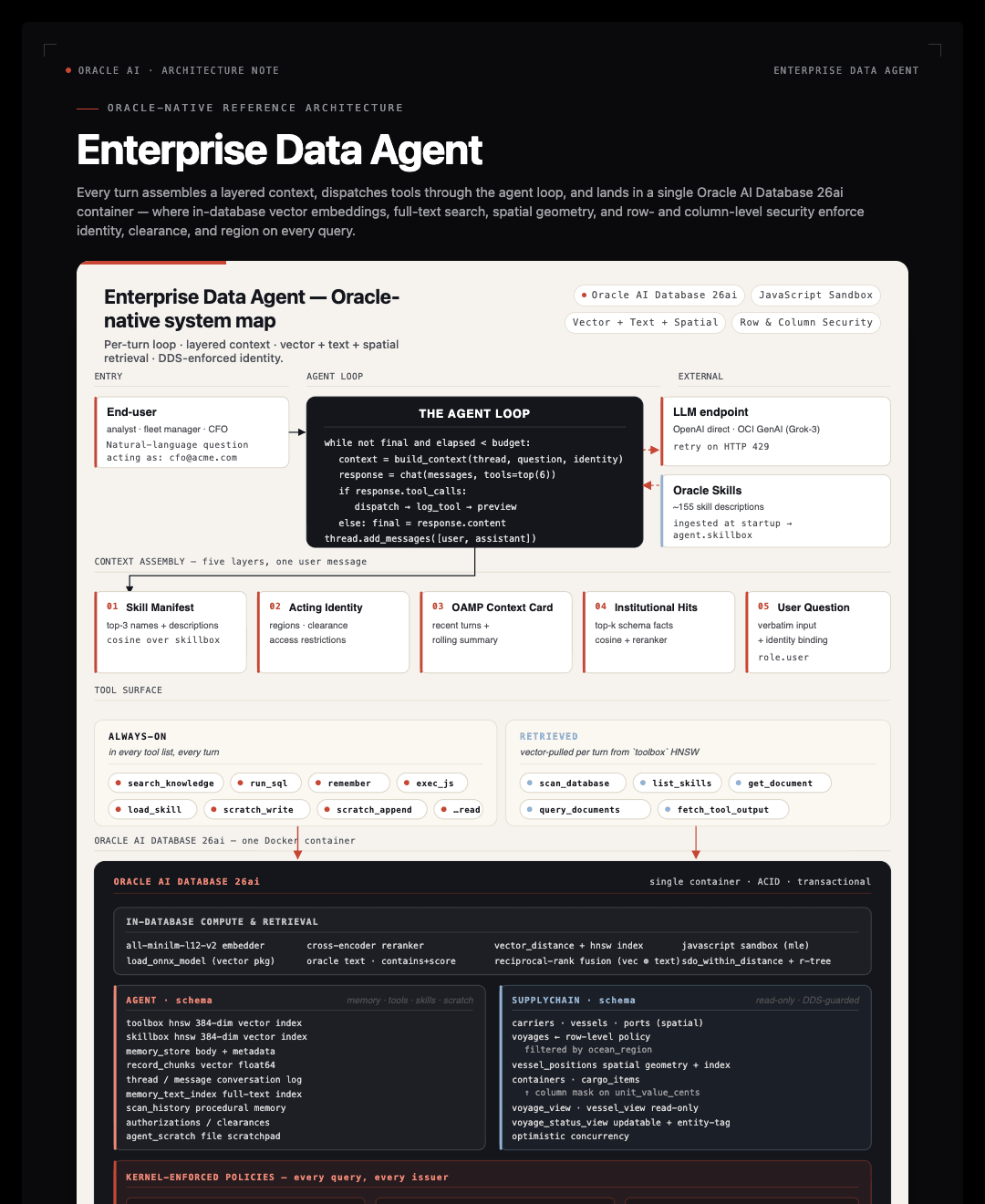
From notebook concept to running application. You build the harness in the notebook, primitive by primitive. The Codespace already has the same harness running as a Flask + React app on the same Oracle — open it at http://localhost:3000 and watch the concept you’re coding become a live product. The notebook teaches the pattern; the app shows it deployed.
This workshop is two halves of the same thing:
-
The notebook (
workshop/notebook_student.ipynb) — you build the harness from primitives. Long-term memory via OAMP, hybrid vector + Oracle Text retrieval, an HNSW-indexedtoolbox, theagent_turnloop, identity-aware row + column policies (the Oracle Deep Data Security pattern, implemented today viaDBMS_RLSbecause Oracle Free doesn’t yet accept the declarative DDS DDL — on a full 26ai DDS image the same setup script lands real DDS policies), JSON Relational Duality Views, theDBMS_SCHEDULERre-scan pattern, tool-output offload. 9 focused coding TODOs across 11 parts, ~1 hour. -
The app (
app/) — a Flask + React reference deployment of the same harness against the same Oracle, same OAMP store, sametoolboxandskillboxthe notebook populates. Chat UI on the left, live-updating memory pane on the right, 3D globe the agent can drive via tool calls. The Codespace boots the app for you on first launch and auto-opens the browser preview athttp://localhost:3000— every harness piece you build in the notebook is wired up live in this app.
The notebook is 11 parts with 9 hands-on coding TODOs. Every “true setup” task — AGENT user creation, vector memory allocation, ONNX model loading, the SUPPLYCHAIN seed, JSON Relational Duality View DDL, DDS policies, the DBMS_SCHEDULER job — is run by the Codespace before you open the notebook (app/scripts/bootstrap.py, seed.py, setup_advanced.py). Each TODO has a hard-stop assert below it so a broken implementation surfaces immediately. Three notebooks ship:
| Notebook | When to open |
|---|---|
notebook_student.ipynb |
Your working notebook — 9 TODO stubs, asserts that fail loudly if a TODO is wrong |
notebook_complete.ipynb |
TODO solutions filled in; everything else is the same |
notebook_complete_with_setup_code.ipynb |
Full source including all Oracle DDL — useful when you want to deploy against an Oracle that isn’t the workshop Codespace |
The whole loop is roughly 300 lines of Python; the rest is database primitives.
The Learning Path
| Step | What you do | Where |
|---|---|---|
| 1 | Wait for the Codespace to finish auto-bootstrapping (Oracle, ONNX models, SUPPLYCHAIN seed, duality views, skillbox, DDS policies, scheduler, app) | Codespace terminal |
| 2 | Read the Part 1 guide, then open workshop/notebook_student.ipynb |
Notebook |
| 3 | Work through TODOs 1–9 — each has a hard-stop assert below it | Notebook |
| 4 | Open the running chat UI at http://localhost:3000 |
Browser preview |
| 5 | Try the starter prompts (below) — every harness piece you just built is wired up live | Browser preview |
| 6 | Read app/README.md for the full app architecture |
Browser |
Workshop Parts
| Part | Topic | Guide | Coding TODO? |
|---|---|---|---|
| 1 | Setup & connectivity | Part 1 | — |
| 2 | Long-term memory with OAMP + scanner | Part 2 | TODO 1 — _scan_tables |
| 3 | Retrieval (vector + hybrid RRF) | Part 3 | TODO 2 — retrieve_knowledgeTODO 3 — hybrid_rrf_search_memories |
| 4 | DBFS scratchpad | Part 4 | — |
| 5 | Oracle MLE compute sandbox | Part 5 | — |
| 6 | Tools & skills (vector-indexed registries) | Part 6 | TODO 4 — tool_run_sql |
| 7 | The agent loop | Part 7 | TODO 5 — agent_turn |
| 8 | Identity-aware authorization (DDS pattern, DBMS_RLS mechanism) | Part 8 | TODO 6 — set_identity |
| 9 | JSON Relational Duality Views | Part 9 | TODO 7 — tool_get_document |
| 10 | Continuous scans via DBMS_SCHEDULER | Part 10 | — |
| 11 | Tool-output offload | Part 11 | TODO 8 — log_toolTODO 9 — tool_fetch_tool_output |
TODO Checklist — 9 coding TODOs at a glance, each with a hard-stop assert checkpoint.
Getting Started
Option A: GitHub Codespaces (recommended — app auto-starts)
-
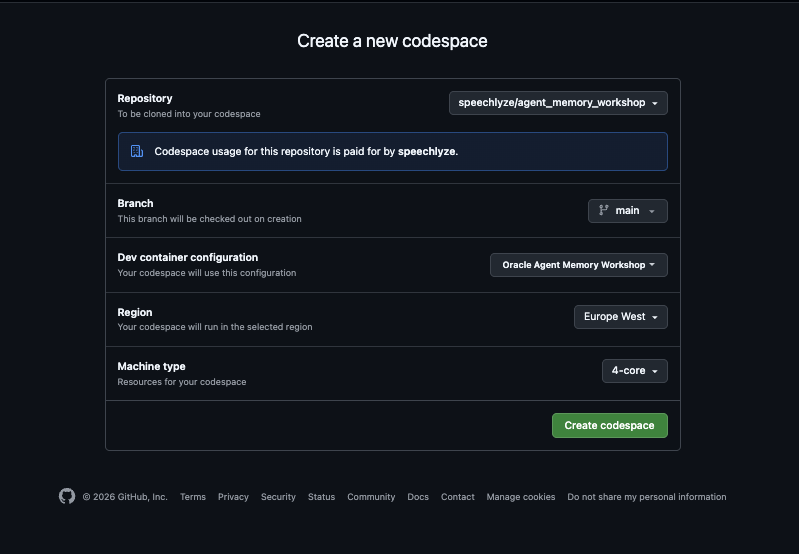
Click the Open in GitHub Codespaces badge above.
-
Click Create Codespace to launch.
- Wait ~5 minutes for the auto-build. The Codespace runs three things in sequence:
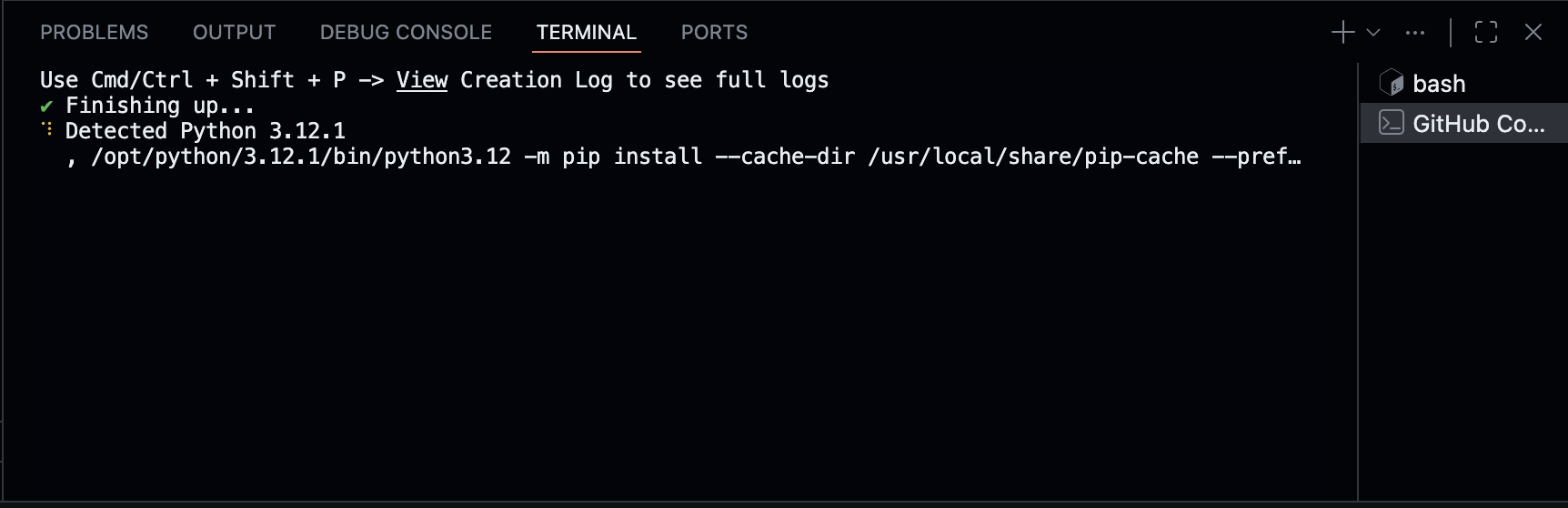
setup_build.sh— installs Python deps (workshop notebook + app backend) andnpm installfor the frontend.setup_runtime.sh— boots Oracle, runsapp/scripts/bootstrap.py(AGENT user, vector pool, ONNX embedder, DBFS), thenapp/scripts/seed.py(SUPPLYCHAIN, duality views, ingestoracle/skillsinto the skillbox), thenapp/scripts/setup_advanced.py(Oracle Text index on OAMP, DDS row/column policies,DBMS_SCHEDULERjob).start_app.sh— starts the Flask backend on:8000and the Vite dev server on:3000.
-
The app opens automatically in a browser preview on port 3000 (
portsAttributes.3000.onAutoForward = "openPreview"). If it doesn't, click the PORTS tab at the bottom of VS Code and open the forwarded port 3000 URL. -
Verify Oracle is healthy (in the terminal):
docker psYou should see
(healthy)for theoracle-freecontainer.
-
Open the workshop notebook to start the build. The auto-attach picks
workshop/notebook_student.ipynbfor you. Select the Python 3.11 kernel:
-
Follow the notebook cells top to bottom. Use the part guides in
docs/when you hit a TODO. Check off tasks against the TODO checklist. - When you finish the notebook, head to the app preview tab at
http://localhost:3000and try the starter prompts below. Every harness piece you just built is wired up there.
First-run note: The first auto-bootstrap can take 5–8 minutes (Oracle Free image is ~3 GB and the ONNX embedder is ~117 MB). Subsequent Codespace opens are ~30 seconds —
start_app.shjust brings the app back up against the existing Oracle volume.
App preview shows “HTTP ERROR 502” or “This page isn’t working”
502 from *.app.github.dev:3000 means port 3000 isn’t serving yet — either the Vite dev server hasn’t bound, the Flask backend (:8000) crashed during init, or you clicked the preview before start_app.sh finished. In a Codespace terminal:
# What's actually running?
ps aux | grep -E "(python app.py|vite|npm.*dev)" | grep -v grep

# Logs (look at the last error)
tail -60 .devcontainer/logs/backend.log
tail -40 .devcontainer/logs/frontend.log

# Most-common fix — just re-run the start script
bash .devcontainer/start_app.sh
If the backend log shows an Oracle connection error, the bootstrap step probably didn’t finish:
bash .devcontainer/setup_runtime.sh    # idempotent — re-runs bootstrap + seed + advanced setup
bash .devcontainer/start_app.sh
If the backend log shows OPENAI_API_KEY is None or an AuthenticationError, the Codespace doesn’t have an LLM key set. Add one:
echo 'OPENAI_API_KEY=sk-...' >> app/.env
bash .devcontainer/start_app.sh
For permanent fixes, add OPENAI_API_KEY (or OCI_GENAI_API_KEY) as a Codespaces secret and rebuild the Codespace.
Option B: Local development
# Pull just this workshop with git sparse-checkout (see top of this README for the full snippet),
# or clone the whole hub and cd in.
git clone --filter=blob:none --no-checkout https://github.com/oracle-devrel/oracle-ai-developer-hub.git
cd oracle-ai-developer-hub
git sparse-checkout init --cone
git sparse-checkout set workshops/enterprise-data-agent-harness-workshop
git checkout main
cd workshops/enterprise-data-agent-harness-workshop

# 1. Start Oracle AI Database (Docker, ~3 min on first run)
docker compose -f .devcontainer/docker-compose.yml up -d oracle

# 2. Install workshop notebook deps + app backend deps
pip install -r requirements.txt
pip install -r app/backend/requirements.txt

# 3. Configure secrets
cp app/.env.example app/.env       # OCI is the default — fill OCI_GENAI_API_KEY

# 4. One-time database setup — RUN ALL THREE, in order
cd app
python scripts/bootstrap.py        # AGENT user, vector pool, ONNX embedder, DBFS
python scripts/seed.py             # SUPPLYCHAIN schema + seed + JSON Duality Views
python scripts/setup_advanced.py   # Oracle Text index + DDS row/column policies + scheduler job
cd ..

# 5. Install the frontend
cd app/frontend && npm install && cd ../..

# 6a. Run the notebook
jupyter lab workshop/notebook_student.ipynb

# 6b. (When you finish the notebook) start the app — two terminals
cd app/backend && python app.py            # backend  → :8000
cd app/frontend && npm run dev             # frontend → :3000
All three setup scripts are required.
bootstrap.pyalone is not enough — the Part 8 DDS demo silently shows the same rows for every identity if you skipsetup_advanced.py(the row policy never gets installed andset_identitywrites to a namespace nothing reads). The Codespace runs all three inpostCreateCommand; locally it’s on you.
Verify the setup landed before opening the notebook:
# Should print 2 — one row policy on VOYAGES, one column mask on CARGO_ITEMS
python -c "
import os, oracledb
c = oracledb.connect(user='sys', password=os.environ.get('ORACLE_SYS_PASS','OraclePwd_2025'),
                     dsn=os.environ.get('ORACLE_DSN','localhost:1521/FREEPDB1'),
                     mode=oracledb.SYSDBA)
with c.cursor() as cur:
    cur.execute(\"SELECT COUNT(*) FROM dba_policies WHERE object_owner='SUPPLYCHAIN'\")
    print('DBMS_RLS policies on SUPPLYCHAIN:', cur.fetchone()[0])
"
Running the App (after the notebook)
The Codespace starts the app for you automatically. If you stopped it or you're running locally:
# Terminal 1
cd app/backend && python app.py

# Terminal 2
cd app/frontend && npm run dev
Open http://localhost:3000.
Starter prompts
Drop these into the chat to exercise different parts of the harness you just built:
| Prompt | What it exercises |
|---|---|
| “What's in the SUPPLYCHAIN schema? Briefly list the entities and relationships.” | Scanner-built institutional knowledge (Part 2) |
| “How many active voyages does each carrier currently have?” | run_sql + the agent loop (Part 6 + Part 7) |
| “Which vessels are within 1500 km of Singapore right now?” | Oracle Spatial — SDO_WITHIN_DISTANCE against vessel_positions.position |
| “Pull the lat/long of every in-transit vessel and use exec_js to compute the haversine distance from the fleet centroid for each. Tell me the farthest one.” | run_sql → exec_js (Oracle MLE) — JavaScript inside the database |
| “Give me the complete document for voyage 7 — vessel, carrier, ports, containers, cargo. Use the duality view if there is one.” | get_document("voyage_dv", "7") — JSON Relational Duality Views |
| “Show me all voyages currently in MEDITERRANEAN with cargo above 100k USD declared value.” | query_documents("voyage_dv", where=...) + DDS column mask if you switch persona |
| “How do I diagnose ORA-00904? Consult any guide you have.” | load_skill("agent/ora-error-catalog") from the skillbox |
The right-hand pane fills in after every turn — top semantic memories, recent tool outputs, skill manifest, token usage. That's the same OAMP store you populated in Part 2 of the notebook.
For full app docs, see app/README.md.
Workshop Files
enterprise-data-agent-workshop/
├── .devcontainer/                  Codespaces auto-bootstrap
│   ├── devcontainer.json           Forwards 1521/8000/3000; pre/post commands
│   ├── docker-compose.yml          Oracle Free 23-slim
│   ├── setup_build.sh              onCreate — pip + npm installs
│   ├── setup_runtime.sh            postCreate — Oracle + bootstrap + seed + advanced setup
│   └── start_app.sh                postStart — backend + frontend in background
├── workshop/
│   ├── notebook_student.ipynb              Your working notebook (9 TODO stubs + asserts)
│   ├── notebook_complete.ipynb             TODO solutions filled in
│   └── notebook_complete_with_setup_code.ipynb   Full source including Oracle DDL
├── docs/
│   ├── part-1-setup.md
│   ├── part-2-oamp-memory.md
│   ├── part-3-retrieval.md
│   ├── part-4-dbfs.md
│   ├── part-5-mle.md
│   ├── part-6-tools-and-skills.md
│   ├── part-7-agent-loop.md
│   ├── part-8-dds-identity.md
│   ├── part-9-duality-views.md
│   ├── part-10-scheduler.md
│   ├── part-11-tool-output-offload.md
│   ├── TODO-checklist.md
│   └── troubleshooting.md
├── app/                            Flask + React reference deployment
│   ├── README.md                   Full app architecture
│   ├── .env.example                Copy to .env and fill in keys
│   ├── backend/                    Flask + Socket.IO + the harness
│   ├── frontend/                   React + Vite + Tailwind UI
│   └── scripts/
│       ├── bootstrap.py            AGENT user, vector pool, ONNX, DBFS, empty toolbox/skillbox
│       ├── seed.py                 SUPPLYCHAIN schema + duality views + skillbox ingestion + scan
│       └── setup_advanced.py       Oracle Text index + DDS policies + DBMS_SCHEDULER job
├── images/                         Architecture diagrams + screenshots
├── enterprise_data_agent.ipynb     Original source notebook (181 cells; mirrored by notebook_complete_with_setup_code.ipynb)
├── requirements.txt                Workshop notebook deps
└── README.md                       (this file)
Stack
- Oracle AI Database 26ai Free via
gvenzl/oracle-free:23-slim. oracleagentmemory— Oracle AI Agent Memory Package (OAMP). Owns the long-term memory schema.oracledb— official Python Oracle driver.- In-database ONNX embedder (
all-MiniLM-L12-v2, 384-dim) loaded viaDBMS_VECTOR.LOAD_ONNX_MODEL. No hosted embedding API. - In-database ONNX cross-encoder reranker (
bge-reranker-base) called viaPREDICTION(). openaiSDK — pointed at OpenAI directly or OCI GenAI's OpenAI-compatible endpoint viaLLM_PROVIDER.- App: Flask + Socket.IO + eventlet (backend); React 18 + Vite + Tailwind + react-globe.gl (frontend).
What is “an agent” in this workshop?
Agent = Model + Harness
The model emits tokens. Everything else — state, memory, tool dispatch, identity, retry logic, budgets — is harness code. Most “agent quality” complaints are harness problems, not model problems.
The harness you build:
- Stores memories in Oracle (long-term: OAMP; procedural:
scan_history). - Embeds and retrieves via in-DB SQL (
VECTOR_EMBEDDING,PREDICTION,CONTAINS). - Dispatches tools registered with a single decorator that introspects the function and writes a vector-indexed row.
- Runs the loop in 90 lines of Python.
The app proves it: those same 90 lines (lifted into app/backend/agent/harness.py) drive a real chat UI against the same Oracle, with end-user identity, live memory pane, and a 3D globe that the agent can drive via focus_world.
Where to Next?
- Oracle AI Agent Memory Package — full OAMP documentation.
- Oracle AI Developer Hub — more technical assets, samples, and projects.
oracle/skills— the skill library that seeds the skillbox (used in Part 6).workshop/notebook_complete_with_setup_code.ipynb— the full-source 105-cell notebook including every Oracle DDL. Open this when you want to deploy the harness against an Oracle that isn't the workshop Codespace.
Built for the Oracle AI Developer Experience team.