oracle-ai-developer-hub
Part 1: Setup & Connectivity
What You Are Building
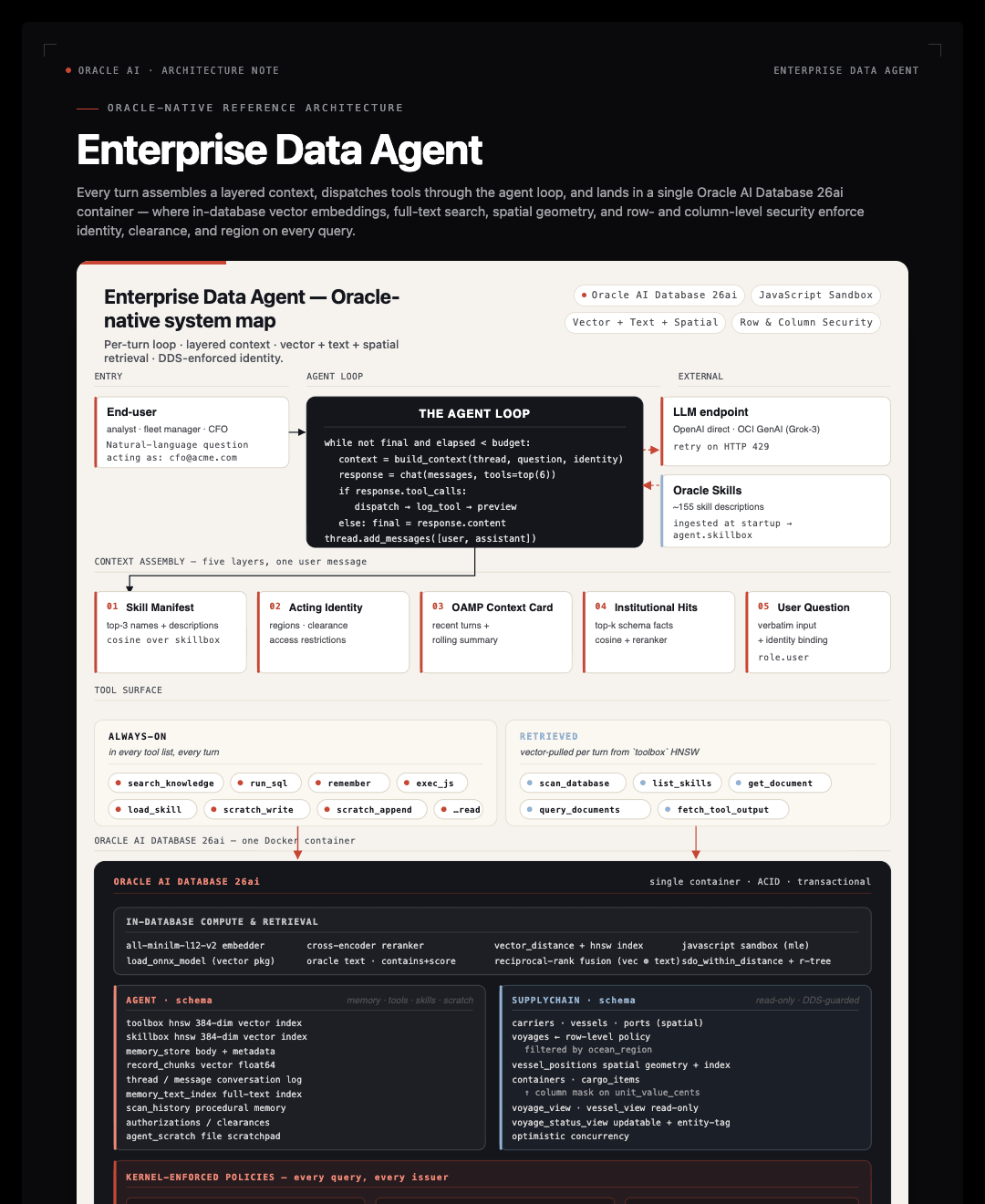
An enterprise data agent: a small loop on top of an Oracle AI Database that lets people ask natural-language questions of live business data without learning the schema.
The formula:
Agent = Model + Harness
The model emits tokens. Everything else — state, memory, tool dispatch, identity, budgets, retry logic — is harness code. Most “agent quality” complaints are harness problems, not model problems. The whole loop you’'’ll build in this workshop is roughly 300 lines of Python; the rest is Oracle.
Working Backwards from Concrete Scenarios
We don’'’t start with “what features should the harness have?” — we start with concrete scenarios and derive the harness piece that makes each possible.
| Desired behaviour | Harness component |
|---|---|
| “What did dispatch correct me about last week?” | Persistent memory — Oracle AI Agent Memory Package (OAMP) |
| “Don’'’t re-run that 4-minute query — re-use the prior result.” | Tool-output offloading — full outputs as OAMP memories |
| “Which tables hold the voyage-delay signal?” | Institutional knowledge — schema scanned into vectors |
| “Find rows relevant to my question even if keywords don’'’t match.” | In-database ONNX embeddings + cross-encoder rerank |
| “Show voyages above 95th percentile by cargo value.” | In-database compute — Oracle MLE |
| “APAC analyst should only see Pacific + Indian voyages.” | Identity-aware kernel policy — DDS row policy |
| “Stop the runaway agent before it makes 1000 tool calls.” | Guarded stop — iteration cap + wall-clock budget |
Oracle-First Stack
Every layer of the harness is something Oracle AI Database already provides. The only piece outside the database is the chat LLM endpoint.
| Concern | What we use |
|---|---|
| Chat LLM provider | OpenAI directly, or OCI GenAI (Grok via OpenAI-compatible endpoint) |
| Database | Oracle AI Database 26ai Free (Docker, on your laptop) |
| Long-term memory | Oracle AI Agent Memory Package (OAMP) — memories, threads, context cards |
| Embeddings | In-database ONNX (all-MiniLM-L12-v2) via DBMS_VECTOR.LOAD_ONNX_MODEL + VECTOR_EMBEDDING |
| Reranking | In-database ONNX cross-encoder via PREDICTION |
| Hybrid retrieval | Vector + Oracle Text fused via Reciprocal Rank Fusion (RRF) |
| Tool registry | toolbox table with HNSW vector index |
| Skill registry | skillbox table seeded from oracle/skills |
| Short-term scratchpad | Oracle DBFS (filesystem on SecureFile LOBs) |
| Sandboxed code execution | Oracle MLE — JavaScript inside the database |
| Identity-aware authorization | Deep Data Security (DDS) row + column policies |
Your Environment
In this Codespace, all of the following are pre-built so you can focus on the agent code:
| Already done | Where it happens |
|---|---|
Oracle AI Database 26ai Free running on localhost:1521/FREEPDB1 |
.devcontainer/docker-compose.yml |
AGENT user created with the grants the harness needs |
Setup cell |
vector_memory_size = 512M and pga_aggregate_limit = 4G |
Setup cell |
ONNX embedder (ALL_MINILM_L12_V2) loaded into the database |
Setup cell |
ONNX reranker (RERANKER_ONNX) loaded if available |
Setup cell |
Chat LLM client (llm) wired to OpenAI or OCI GenAI |
Setup cell |
| Database connection settings | |
|---|---|
| Host | localhost |
| Port | 1521 |
| Service | FREEPDB1 |
| SYS password | OraclePwd_2025 |
| App user | AGENT |
| App password | AgentPwd_2025 |
Reference: connect()
The notebook defines a thin retry wrapper around oracledb.connect:
def connect(user, password, dsn, mode=None, retries=5):
    for attempt in range(1, retries + 1):
        try:
            kwargs = dict(user=user, password=password, dsn=dsn)
            if mode is not None:
                kwargs["mode"] = mode
            conn = oracledb.connect(**kwargs)
            with conn.cursor() as cur:
                cur.execute("SELECT banner FROM v$version WHERE rownum = 1")
                print(f"connected as {user}@{dsn}")
            return conn
        except Exception:
            time.sleep(3)
The retry exists because Docker healthchecks signal “container alive” before Oracle’'’s listener is fully ready — a few seconds of retry covers that gap.
Why a Dedicated AGENT User
Running the agent as SYS would be reckless — any hallucinated DROP TABLE becomes a real outage. We create a dedicated low-privilege user, AGENT, that owns its own schema (where harness state lives — memory, scratchpad, tools, skills) and is granted SELECT on the business schemas it’'’s allowed to read.
The trust boundary is grants, not Python code. Read the bootstrap_stmts block in the notebook to see exactly what AGENT is allowed to do.
Two Database Parameters That Matter
vector_memory_size — Oracle 26ai stores HNSW vector indexes in a dedicated in-memory pool. On a stock Free image it ships at 0, so any CREATE VECTOR INDEX ... ORGANIZATION INMEMORY ... statement raises ORA-51962. The setup cell sets it to 512 MiB at SPFILE scope; this requires a one-time docker restart oracle-free the first time.
pga_aggregate_limit — DBMS_VECTOR.RERANK allocates enough transient PGA per call that the Free build’'’s default ceiling (~2 GiB) is exceeded under modest load, surfacing as ORA-04036. The setup cell raises it to 4 GiB at the CDB level (the only level where this parameter accepts changes).
You don’'’t need to remember the details — both parameters are configured in the pre-built setup cell. They’'’re explained here so you know what to look up if you hit one of these errors against a non-Codespaces database.
ONNX Models in the Database
The setup cell loads two ONNX models into the database:
ALL_MINILM_L12_V2— a 384-dim sentence embedder. Everyadd_memory, everysearch, everytoolboxinsert/retrieve calls it viaVECTOR_EMBEDDING(...)directly from SQL. No network round-trip to OpenAI for embeddings.RERANKER_ONNX— a cross-encoder rescoring model called viaPREDICTION(reranker USING :q AS DATA1, :doc AS DATA2)on the top-k cosine candidates.
Both are registered with DBMS_VECTOR.LOAD_ONNX_MODEL. The embedding model lives where the data lives — same backups, same audit, same security model.
Connecting to the already-bootstrapped Oracle
There’s no TODO in Part 1. The Codespace ran app/scripts/bootstrap.py on first launch, so the AGENT user, vector pool, ONNX models, and DBFS scratchpad are all in place. The notebook just opens a Python session:
agent_conn = connect(AGENT_USER, AGENT_PASS, SYS_DSN)
That’s the only line you run in Part 1 that touches Oracle. The rest is pure Python (imports + a chat() retry wrapper around client.chat.completions.create).
If you want to see how the Oracle setup was done, read app/scripts/bootstrap.py or open workshop/notebook_complete_with_setup_code.ipynb — the full source that includes every DDL.
Key Takeaways — Part 1
- Agent = Model + Harness. The model emits tokens; everything else (state, dispatch, memory, identity, budgets) is harness code. Most “agent quality” complaints are harness problems, not model problems.
- Separate the agent’'’s DB user from the data’'’s DB user.
AGENTowns harness state;SUPPLYCHAINowns business data. The trust boundary is grants, not Python code. vector_memory_sizeis non-optional for HNSW. Without it,CREATE VECTOR INDEX ORGANIZATION INMEMORY NEIGHBOR GRAPHraisesORA-51962and you silently fall back to full-table cosine scans.- ONNX models load into the database. Embeddings come from
VECTOR_EMBEDDING(...)SQL calls, not network round-trips. Same trust boundary as your data, lower latency, no egress.
Troubleshooting
ORA-12541: TNS:no listener — The Oracle container isn’'’t ready yet. Wait 30 seconds and retry.
ORA-01017: invalid username/password — The AGENT user wasn’'’t created. The setup cell creates it on first run; rerun the setup cell.
ORA-51962: vector memory area is out of space — vector_memory_size = 0. Run the setup cell, then docker restart oracle-free, then restart the kernel and re-run from the top.
Check the troubleshooting guide for more.