oracle-ai-developer-hub
Part 6: Tools & Skills
The agent needs a way to do things in the world — execute SQL, run code, write to a scratchpad, fetch a document. In this harness:
| Concept | Lives in | Consumed as |
|---|---|---|
| Tool | toolbox table (vector-indexed) |
OpenAI-style function call, dispatched by the loop |
| Skill | skillbox table (vector-indexed) |
Prose markdown the model reads on demand |
Both use the same retrieval primitive — vector search over an in-database HNSW index — but they are surfaced differently. Tools are dispatched (the loop runs them); skills are read (the loop inlines a manifest, the model decides whether to load the body).
Why Vector-Indexed Tools?
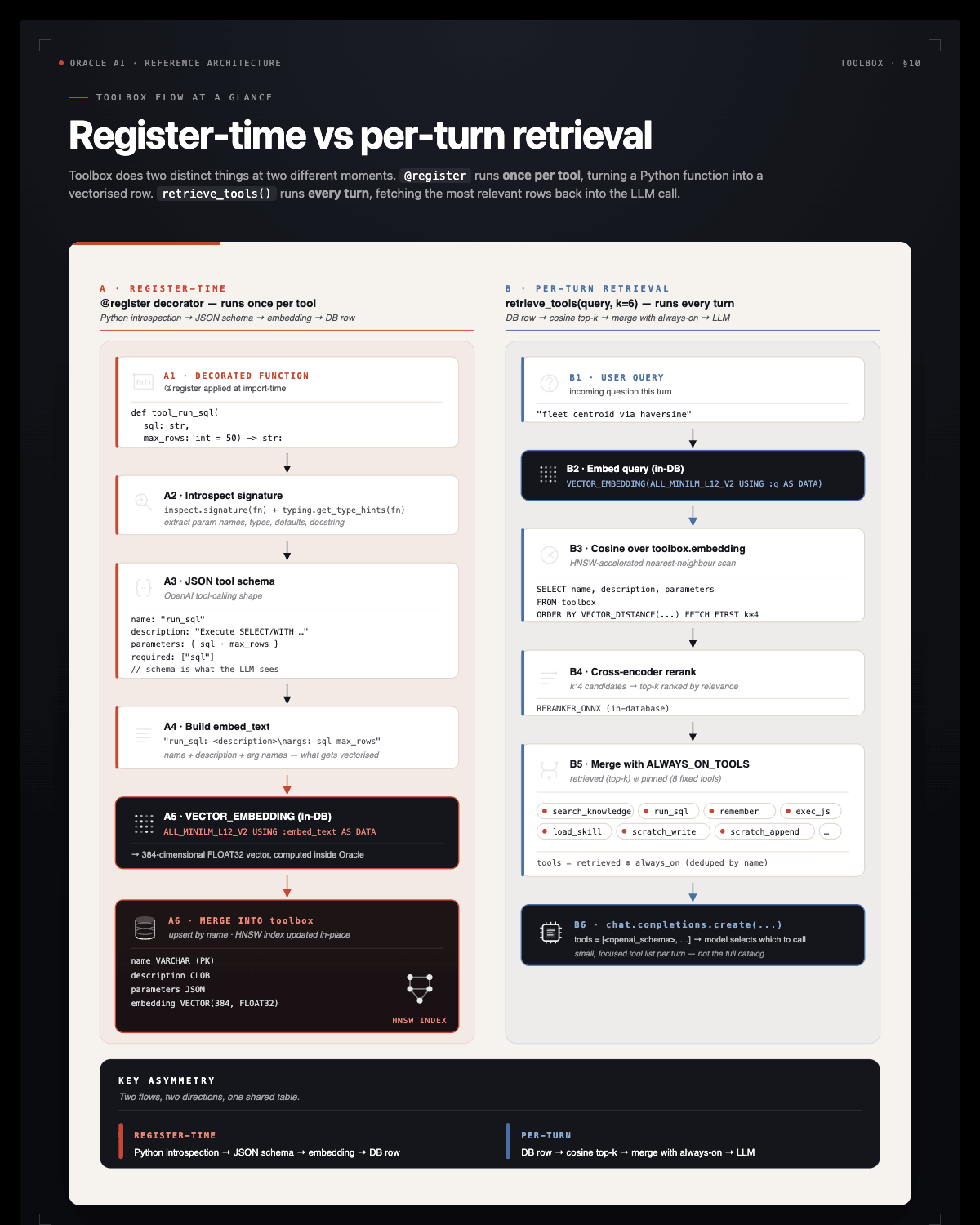
If the registry has 6 tools, it’'’s harmless to put them all in every LLM call. Once you have 30+ tools (per-system MCP servers, per-team helpers), the model starts confusing them and the per-turn token bill grows linearly with the registry. Indexing tools by an embedding of name + description + arg names lets us pass only the relevant top-k for a given user query.
We still always include a small always-on set — run_sql, search_knowledge, remember, exec_js, load_skill — they’'’re cheap and the agent calls them on almost every turn.
The @register Decorator
Pre-built. Read it before doing the TODO. The decorator is argument-less — @register introspects the function and writes both the in-memory entry and the toolbox row.
def register(fn):
    """Argument-less decorator: name from __name__, description from __doc__,
    parameters schema from the signature + type hints. Embedding for the
    `toolbox` row is computed in-DB via VECTOR_EMBEDDING — no Python-side
    embedder, no network call."""
    name, description, parameters, openai_schema = _build_schema(fn)
    TOOLS[name] = (fn, openai_schema)

    arg_text = " ".join(parameters["properties"].keys())
    embed_text = f"{name}: {description}\nargs: {arg_text}"

    with agent_conn.cursor() as cur:
        cur.execute(
            "MERGE INTO toolbox t USING (SELECT :tn AS n FROM dual) s ON (t.name = s.n) "
            "WHEN MATCHED THEN UPDATE SET description = :td, parameters = :tp, "
            f"  embedding = VECTOR_EMBEDDING({ONNX_EMBED_MODEL} USING :etext AS DATA), "
            "  updated_at = CURRENT_TIMESTAMP "
            "WHEN NOT MATCHED THEN INSERT (name, description, parameters, embedding) "
            f"  VALUES (:tn, :td, :tp, VECTOR_EMBEDDING({ONNX_EMBED_MODEL} USING :etext AS DATA))",
            tn=name, td=description, tp=json.dumps(parameters), etext=embed_text,
        )
    agent_conn.commit()
    return fn
Three things happen:
- Introspection —
_build_schema(fn)readsfn.__name__,fn.__doc__, and the type hints to produce an OpenAI-compatiblefunctionschema. - Embedding in SQL —
VECTOR_EMBEDDING(ALL_MINILM_L12_V2 USING :etext AS DATA)runs inside the database. No Python embedder. - MERGE — re-running
@register fnupdates the row in place. Re-defining a tool is a one-line change.
The _build_schema helper requires every tool to have a docstring — without one, retrieval would have nothing to embed. Always write a docstring. It is the tool’'’s public spec.
TODO 4: Register tool_run_sql
run_sql is the agent’'’s primary way to query live data. It must be read-only — SELECT and WITH only, no DDL, no DML. The agent shouldn’'’t be able to DROP TABLE even if a hostile prompt asks it to.
The _READ_ONLY regex is pre-defined:
_READ_ONLY = re.compile(r"^\s*(select|with)\b", re.IGNORECASE)
Your job: decorate a function tool_run_sql(sql: str, max_rows: int = 50) -> str with @register. The function:
- Rejects any statement that doesn’'’t match
_READ_ONLY. - Executes the SQL on
agent_conn. - Returns up to
max_rowsrows as JSON:{"columns": [...], "rows": [...], "row_count": N}. - On any database error, returns
{"error": "..."}.
CLOB columns need special handling — v.read() if hasattr(v, "read") else v for each cell.
Solution:
@register
def tool_run_sql(sql: str, max_rows: int = 50) -> str:
    """Execute a READ-ONLY SQL statement (SELECT/WITH only) against the target Oracle AI Database
    and return up to `max_rows` rows as JSON. Reject any statement that isn'''t read-only.
    """
    if not _READ_ONLY.match(sql.strip()):
        return json.dumps({"error": "only SELECT / WITH statements are allowed in run_sql"})
    try:
        with agent_conn.cursor() as cur:
            cur.execute(sql)
            cols = [d[0] for d in cur.description]
            rows = []
            for i, r in enumerate(cur):
                if i >= max_rows:
                    break
                rows.append([(v.read() if hasattr(v, "read") else v) for v in r])
        return json.dumps({"columns": cols, "rows": rows, "row_count": len(rows)},
                          default=str)
    except Exception as e:
        return json.dumps({"error": str(e)})
Notice three things:
- The docstring is the tool description. It tells the LLM when to call this tool, not just how. Prefer “Use this when…” phrasing.
json.dumps(..., default=str)handlesdatetime,Decimal, etc. that aren’'’t JSON-native. Without this, dates raiseTypeError.- Error handling returns JSON. The LLM reads the tool output as a string; an error in JSON form is something it can react to (“the column doesn’'’t exist, let me check the schema”).
After this cell runs, tool_run_sql is in the TOOLS registry and a row in the toolbox table.
The Toolset (Pre-Built)
The notebook registers these tools beyond tool_run_sql:
| Tool | What it does |
|---|---|
scan_database(owner) |
Run the §2 scanner against a schema; append facts to OAMP. |
search_knowledge(query, k, kinds) |
Semantic search over the agent’'’s long-term memory. |
exec_js(code) |
Run JavaScript inside Oracle MLE — deterministic compute the LLM shouldn’'’t do in its head. |
scratch_write(path, content) / scratch_read(path) / scratch_append(path, content) |
DBFS scratchpad I/O. |
remember(subject, body, kind) |
Persist a correction or learning into memory. |
load_skill(name) / list_skills(query) |
Read a prose playbook from the skillbox. |
You’'’ll see the agent dispatch most of these in §5’'’s end-to-end demo.
Skills: Procedural Memory for How to Do Things
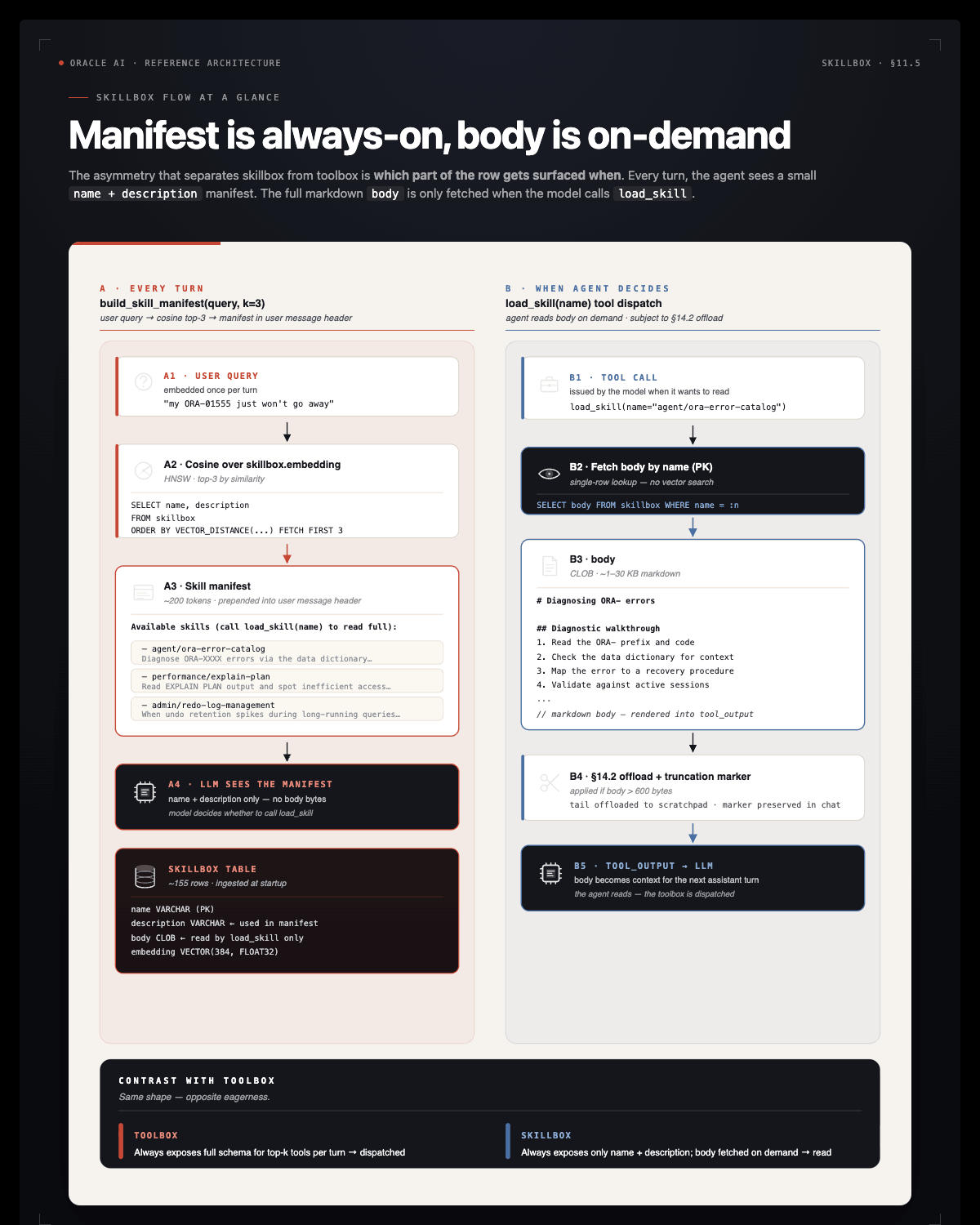
The §10 toolbox answers “what can the agent call?” — function specs, dispatched as tool_calls. The skillbox answers a different question: “what does the agent know how to do?” — prose playbooks the model reads as part of its context.
Two procedural-memory tables, parallel structures:
toolbox |
skillbox |
|
|---|---|---|
| Holds | Callable function specs | Prose markdown playbooks |
| Consumed as | tools=[...] parameter — dispatched |
Text in context — read |
| Per-turn injection | Top-k schemas + always-on | Top-k names + 1-line desc (manifest) |
| Full content | n/a (functions just run) | load_skill(name) returns the body |
Source: oracle/skills/db. Oracle publishes a curated library — 100+ guides organized by category (agent, performance, security, plsql, sqlcl, …). Each .md file is a skill: an H1 title, a first-paragraph description, and a body of prose + SQL examples.
The pre-built ingestion cell mirrors them into skillbox with their content SHA so re-ingestion is idempotent. ~155 skills × ~5 KB → 15 KB per turn if we always-injected — far too much. Instead:
- The manifest (top-3 skill names + descriptions, ~200 tokens) is prepended to every prompt by
build_skill_manifest. - The full body is one
load_skill(name)tool call away.
The model sees the menu without paying for the meal.
Key Takeaways — Part 6
- Tools are Python callables with embeddings. The
@registerdecorator introspects the function and writes a vector-indexed row. Function name + docstring + arg names are the public spec. - Vector retrieval keeps the prompt lean. With 30+ tools, including all of them every turn confuses the model. Top-k by cosine over the user query exposes only what’'’s relevant — registry size grows without per-turn cost growing.
- Always-on vs retrieved. Cheap-and-frequent tools (
run_sql,search_knowledge,remember,load_skill) ship in every prompt. Specialised tools come from the toolbox lookup. - Tools answer “what can I call?”. Skills answer “what do I know how to do?”. Tools are dispatched as function calls; skills are prose playbooks the model reads.
Troubleshooting
ValueError: tool '"'"'tool_run_sql'"'"' has no docstring — The _build_schema helper requires a docstring. Add one.
@register raises ORA-51962 — The HNSW vector index couldn’'’t be created. Check vector_memory_size and bounce the DB if needed (see Part 1).
@register succeeds but retrieve_tools returns empty results — Run the cell that registers tools first. Without rows in toolbox, vector search has nothing to retrieve.