Export and Manage Resources from Azure (Non-Greenfield Workflow)
Important Export behaviour
- Toolkit will over-write the data in specific tabs of CD3 Excel sheet with exported content from Azure while the other tabs remain intact.
- Differential state import of the objects will be performed, ie the import statements will be generated only for the objects which are not already there in state file.
Step 1:
Choose the Azure CD3 Excel sheet template from Excel Templates
and copy at /cd3user/azure/<prefix>/
Copy CD3 Excel File
-
While using the container launched using RM Stack, local path
/cd3user/mount_pathon the VM is mapped to/cd3user/inside the container. So the Excel template can be copied at/cd3user/mount_path/azure/<prefix>/on the VM. Below is the sample command to copy the Excel template from local system to container: -
Note that the user
cd3usercan be used to connect to the VM because same key is pushed foropcas well ascd3user.
Step 2:
Modify /cd3user/azure/<prefix>/<prefix>_setUpAzure.properties
Add the location of CD3 excel file under cd3file parameter and set workflow_type to export_resources as shown below.
The other parameters are already updated with correct values.
[Default]

#Input variables required to run setUpAzure script

#path to output directory where terraform file will be generated. eg /cd3user/azure/<prefix>/terraform_files
outdir=

#prefix for output terraform files eg demo
prefix=

# Auth Params
subscription_id=

tenant_id=

client_id=

client_secret=

#path to cd3 excel eg /cd3user/azure/<prefix>\CD3-Customer.xlsx
cd3file=

#specify create_resources to create new resources in Azure(greenfield workflow)
#specify export_resources to export resources from Azure(non-greenfield workflow)
workflow_type=export_resources
Step 3:
Execute the setUpCloud.py script to start exporting the resources to CD3 and creating the terraform configuration files.
Command to Execute:
Example Execution
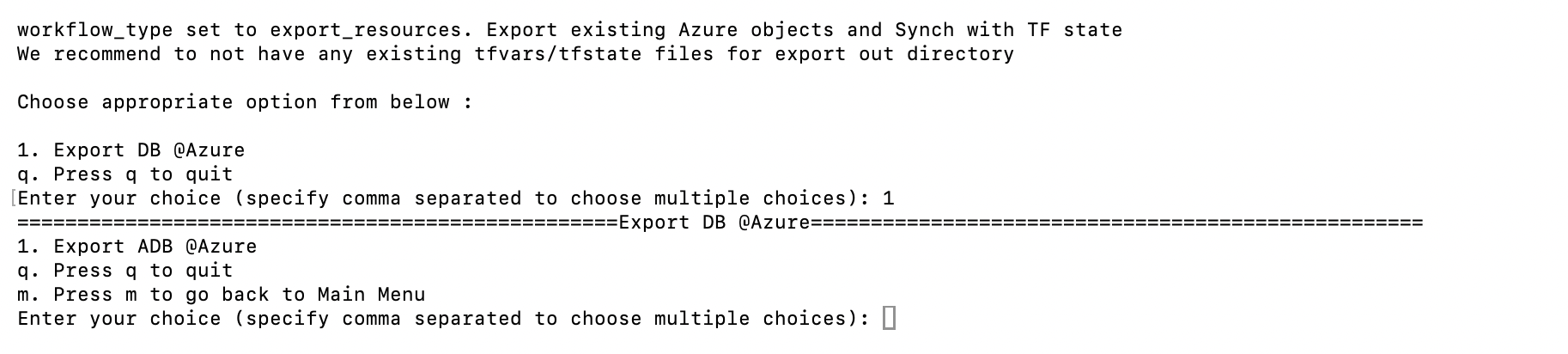
See below image for DB @Azure export options. Only export to ADB is supported at the moment.
Expected Outputs:
a. Excel sheet with the resource details from Azure.
b. Configuration files - *.auto.tfvars
c. Shell Script with import commands - import_commands_<resource>.sh
Step 4:
Execute the import_commands_<resource>.sh files that are generated in the outdir.
The terraform plan should show that infrastructure is up-to-date with no changes required for all regions.
Modify existing resources
- Once the export (including the execution of import_commands_
<resource>.sh) is complete, switch the value of workflow_type back to create_resources in<prefix>_setUpAzure.properties. This allows the toolkit to modify these resources or create new ones on top of them.