Connect CD3 Container to GCP Account
Connecting the CD3 container to an GCP Account authenticates the toolkit, allowing it to create, update, or export resources from GCP Cloud.
Prerequisite - Installing CD3 Automation toolkit
🛠️ Steps:
1 - Login (Exec) into the Container
-
Login to the previously launched container using either RM Stack or Manual Launch.
2 - Edit connectGCP.properties
-
Run
-
Fill the input parameters in
connectGCP.propertiesfile. Expand below tables for parameter description and sample data. Description for each parameter is also provided within the file.
📋 connectGCP.properties
Parameter Description
| Parameter | Description | Example | Mandatory Parameter? |
|---|---|---|---|
| prefix | Friendly name for the GCP Account. The generated .auto.tfvars files will be prefixed with this. | demo | Yes |
| auth_mechanism | Auth Mechanism for GCP APIs | api_key | No |
| config_file | Path to JSON file having private key information for the service account | /cd3user/gcp/keys/gcp_api_private.json | No |
Important Configuration Tips- Offline tfvars Generation
- Auth Details Parameters are optional.
- If left empty, the toolkit will not be able to run any APIs against the GCP account.
-
This will mean that -
Toolkit will be able to generate just the terraform (tfvars files) without having the ability to apply it. Also export workflow will not be executed.Benefits
- Offline mode avoids storing GCP credentials/secrets in the CD3 container or generated files.
4 - Initialise the environment
-
Initialise your environment to use the Automation Toolkit with GCP Cloud.
Heads-Up!
- When running the CD3 container on a Linux VM host (without using the Resource Manager stack option), refer to point no. 7 under FAQ to avoid any permission issues.
Output:
Output files
| Files Generated | At File Path | Comment/Purpose |
|---|---|---|
| setUpGCP.properties | /cd3user/gcp/<prefix>/<prefix>_setUpGCP.properties | Subscription Specific properties file |
| Terraform files directory | /cd3user/gcp/<prefix>/terraform_files | outdir for the generation of terraform files. |
| Variables File,Provider File, Root and Sub terraform modules | /cd3user/gcp/<prefix>/terraform_files/ | Required for terraform to work. Variables file and Provider file will contain authentication parameters if provided while running above script. |
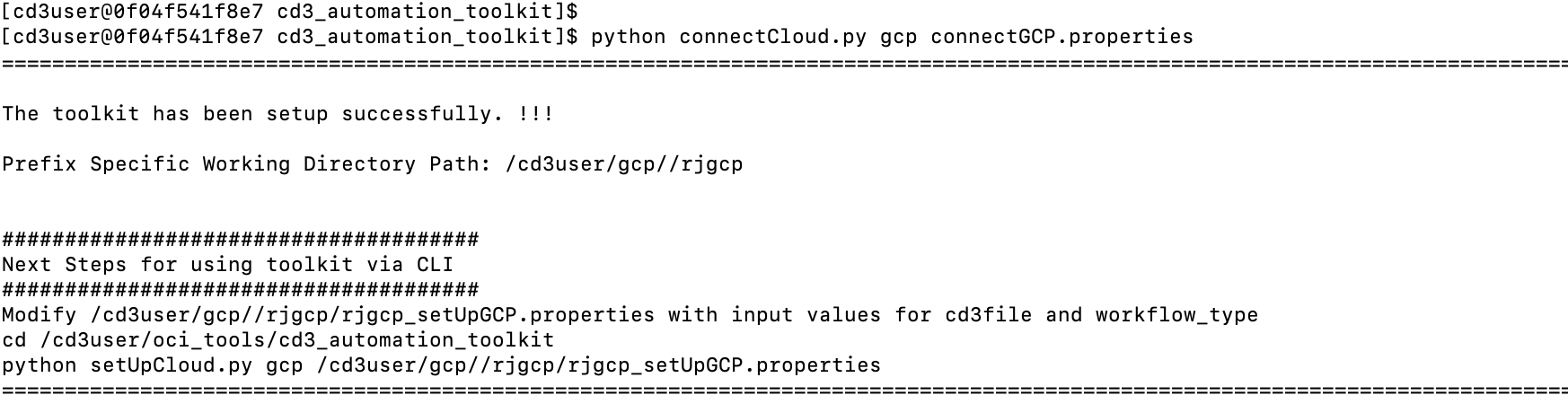
| out file | /cd3user/gcp/<prefix>/connectGCP.out | This file contains a copy of information displayed as the console output of the script |
| connectGCP.properties | /cd3user/gcp/<prefix>/.config_files/<prefix>_connectGCP.properties | The input properties file used to execute the script is copied to prefix folder to retain for future reference. This can be used when the script needs to be re-run with same parameters at later stage. |
Example execution of the script
Managing Multiple Prefixes?
Easily manage multiple environments in a single CD3 container using distinct prefixes.
Check this out: Multiple Prefixes
Proceed to the below instructions: