oracle-ai-developer-hub
Financial Fraud Agent Harness Workshop — Lightweight
Build a memory-aware AML data agent — a Meridian Bank financial-crime analyst — on Oracle AI Database 26ai. Then watch the same harness run as a Flask + React app.

The badge opens the standalone workshop repository — Codespaces cannot use a devcontainer nested in a hub subfolder.
Dataset on Hugging Face: every table the workshop produces (bank world, AML knowledge, agent memories, triage runs) is published with embeddings as OracleDevs/financial-fraud-workshop-minilm (384-d) and OracleDevs/financial-fraud-workshop-bge-m3 (1024-d).
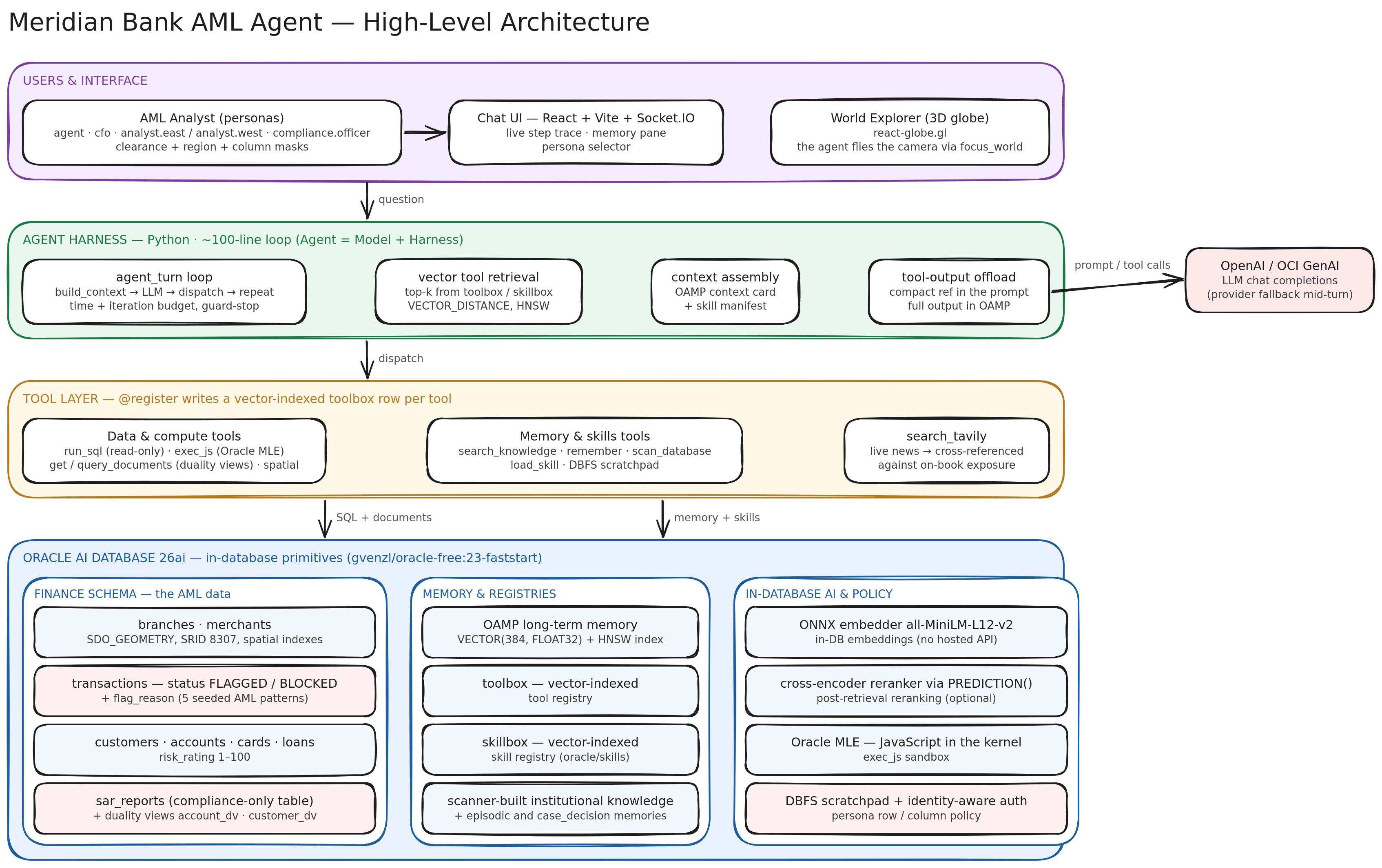
Agent = Model + Harness. The model emits tokens; everything else — memory, retrieval, tool dispatch, identity, budgets — is harness code. This workshop builds that harness twice: from primitives in the notebook, and as a running product in app/.
The notebook: eight TODOs
90-minute session (about 60 minutes hands-on). notebook_student.ipynb builds the harness from primitives. Oracle is already provisioned (.devcontainer/provision.sh runs app/scripts/bootstrap.py → seed.py → setup_advanced.py → setup_deep_security.py, idempotently): the AGENT user, the in-database ONNX embedder (and the cross-encoder reranker when provisioned), the seeded FINANCE schema, the Oracle Text index and the skillbox. Each TODO has a checkpoint cell below it; Run All is supposed to halt at the first unfinished one.
| Part | Topic | TODOs |
|---|---|---|
| 1 | Setup, Oracle connectivity, chat client | 1 QUESTION |
| 2 | Long-term memory with OAMP | 2 recall_memories · 3 _scan_tables |
| 3 | Retrieval with langchain-oracledb | 4 retrieve_knowledge (hybrid search is provided) |
| 4 | Toolbox and skillbox | 5 retrieve_tools · 6 tool_run_sql · 7 tool_list_skills |
| 5 | Context engineering and the agent loop | 8 agent_turn |
| 6 | Autonomous AML triage (capstone) | none: run it |
- Answers:
notebook_complete.ipynb, the same notebook solved, with outputs saved. - Guides:
docs/· TODO checklist · troubleshooting - Reference guides, not in the notebook: DBFS · Oracle MLE · Deep Data Security · duality views · tool-output offload
The demo bank. Meridian Bank: 60 branches and 140 merchants (Oracle Spatial) across four regions, 2,000 customers, 2,650 accounts, ~23,600 transactions over 90 days, 900 loans, 117 SAR reports, plus the AML desk’s paperwork — sanctions screenings, beneficial owners, wire messages, login events, KYC documents, case notes. A slice of the transactions is deliberately suspicious, and transactions.flag_reason records which rule fired: STRUCTURING, GEO_VELOCITY, HIGH_RISK_COUNTRY, RAPID_CASH_OUT, LARGE_CASH_DEPOSIT. That column is the fraud use case — it turns “query the bank” into a money-laundering investigation (one-pager).
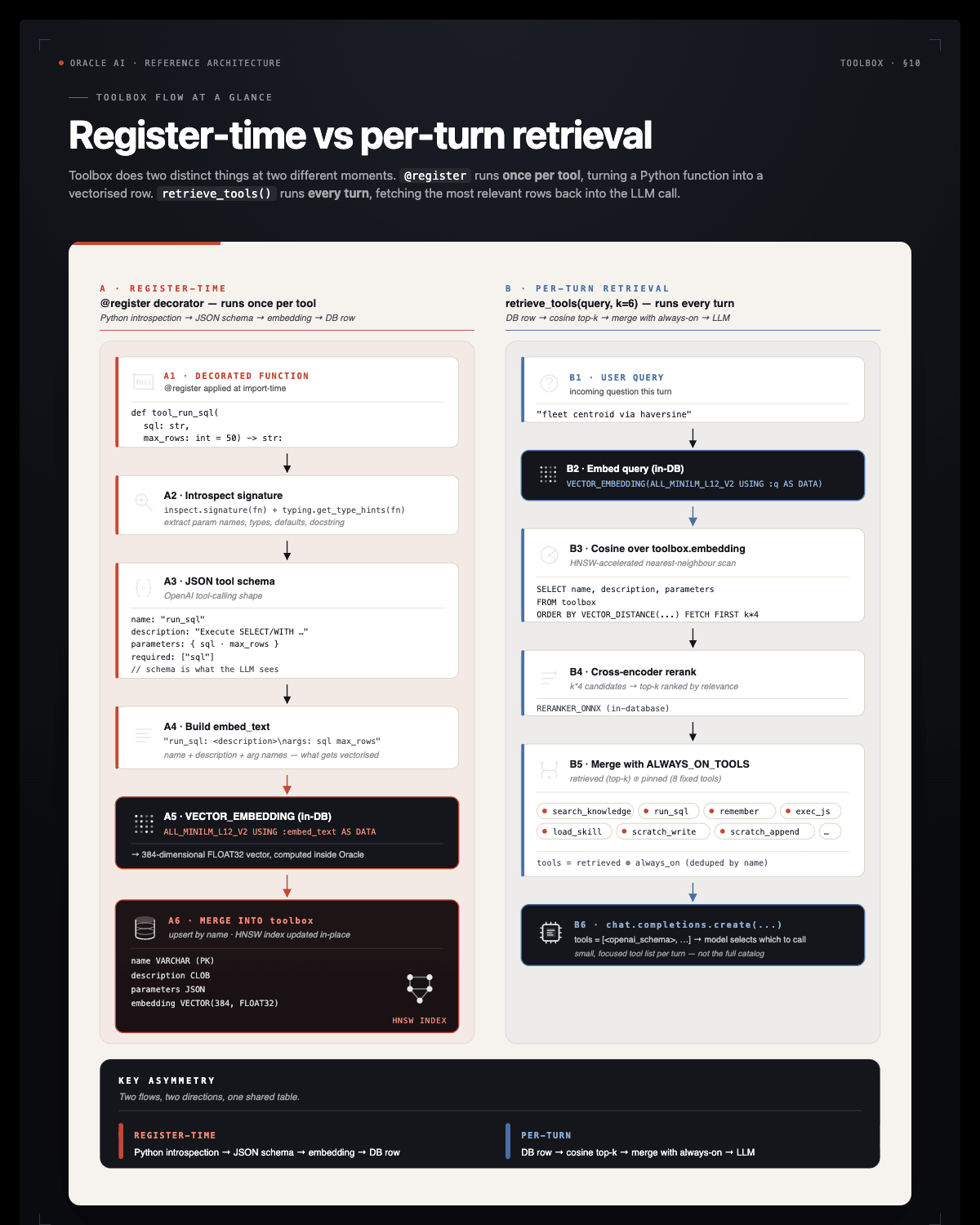
The app — the same harness, running
The Codespace starts the Meridian Bank AML app (Flask + Socket.IO + React) against the same Oracle, the same OAMP store, and the same toolbox / skillbox the notebook writes to. Open http://localhost:3000.
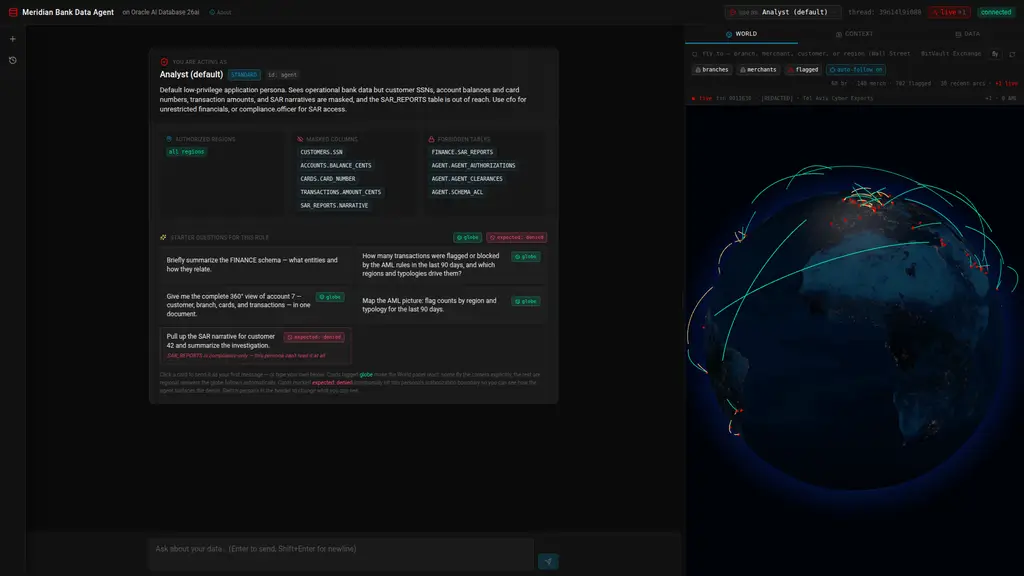 Every fresh thread opens with the active persona’s clearance, authorized regions, masked columns, and forbidden tables — plus starter prompts verified to return real rows for that persona.
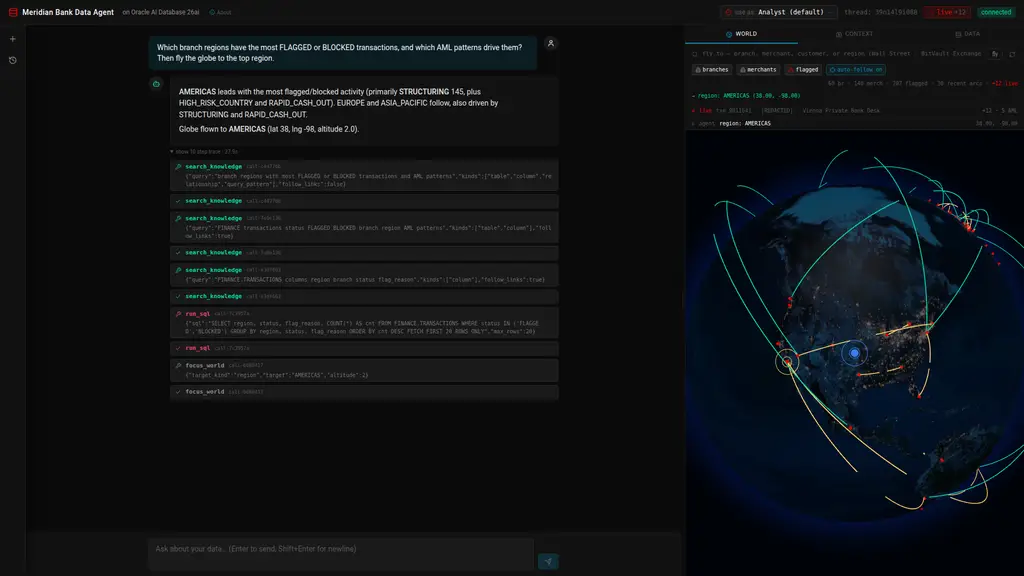 One turn, the full trace: five
 search_knowledge calls, two run_sql, two focus_world. On the right, the real World Explorer shows the globe the agent just flew to AMERICAS.
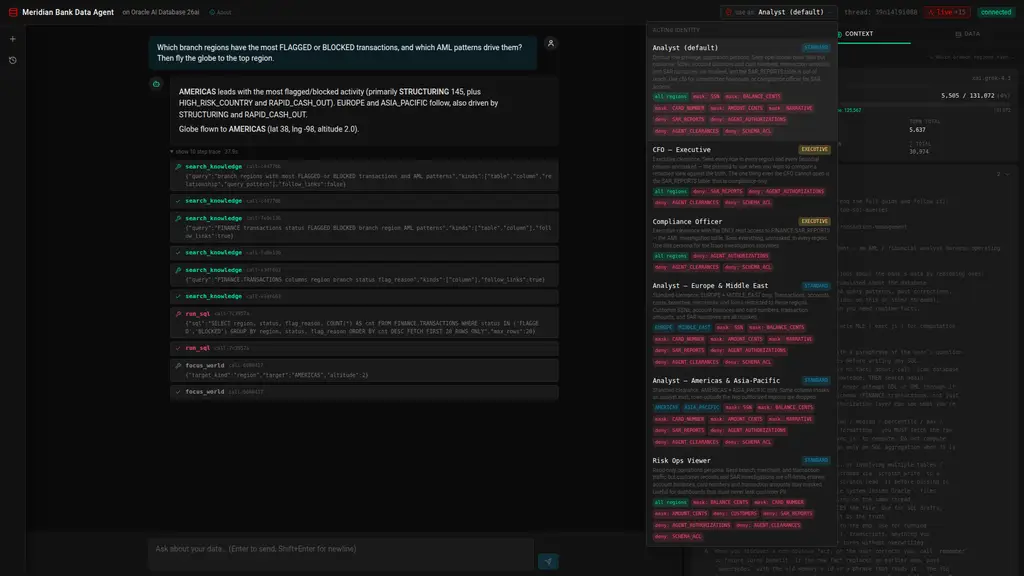 Identity is enforced in the database, not the UI: pick a persona and the same SQL returns different rows. As
 agent the SAR query returns nothing; as compliance.officer it returns every report, because the kernel decides.
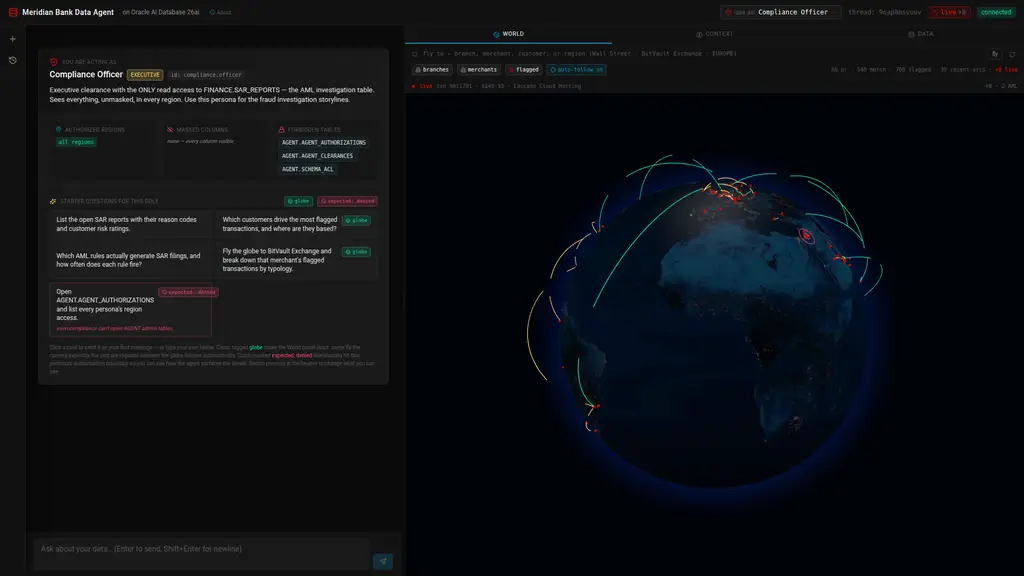 World Explorer: branches, merchants, and the suspicious-activity layer — flagged and blocked transactions plotted at their merchant with arcs coloured by AML flag reason, plus a live feed of new transactions.
What the app adds beyond the notebook: a live memory pane (top memories, tool outputs, skill manifest, token usage) on every turn, the World Explorer globe the agent can fly, per-request identity switching, Oracle MLE, Spatial and duality-view tools, DBFS scratch tools, scheduled rescans, and a triage ledger that notebook Part 6 writes and the app can read back.
| Try this in the app | What it exercises |
|---|---|
| “Which branch regions have the most FLAGGED or BLOCKED transactions?” | run_sql + the agent loop |
| “Which merchants are within 1500 km of Dubai right now?” | Oracle Spatial — SDO_WITHIN_DISTANCE |
| “Give me the complete document for account 7 — customer, branch, cards, transactions.” | JSON Relational Duality Views |
| “List the Suspicious Activity Reports.” | identity in the kernel: all 117 as compliance.officer, nothing as the default Analyst |
| “What did the AML triage desk decide, and what is under review?” | after notebook Part 6 — run_sql over AGENT.AML_TRIAGE |
Full documentation: app/README.md.
The capstone — decisions, not answers
Part 6 stops taking questions and works the queue. The harness builds Meridian Bank’s AML alert queue from FINANCE, assembles an evidence pack per alert, decides ESCALATE / KYC_REVIEW / DISMISS with a confidence and a written rationale, records every decision in AGENT.AML_TRIAGE and in memory, and reports what the run was worth to the bank — with exactly one labelled assumption in the arithmetic. Autonomy is the same loop plus a trigger, a record, and a budget. Guide: docs/part-6-autonomous-aml-triage.md.
The running app carries that capstone as a live instrument: the Autonomous tab works the newest alerts on demand, replaying a captured Grok-4.3 triage run (verbatim decisions and per-step latencies, no live tokens spent; alerts without a capture fall through to the harness’s REVIEW_REQUIRED path), streaming each evidence pack, tool call, decision and ledger row as it happens — while the world feed keeps landing fresh activity on the same customers. See app/README.md §9.
Run it
In Codespaces (nothing to install):
- Click Open in GitHub Codespaces above, then Create Codespace. First build ≈ 5–8 minutes: Oracle Free plus the ONNX models (~117 MB).
- Wait for the post-create step to finish — it installs dependencies, boots Oracle, and provisions the database.
- Add
OCI_GENAI_API_KEYas a Codespaces secret (restart the Codespace after adding it). The notebook reads it from the kernel environment (rotating bad keys acrossOCI_GENAI_API_KEY+OCI_GENAI_API_KEY_2..6and, instructor-side, falling back to the Chicago keysOCI_GENAI_FALLBACK_ENDPOINT+OCI_GENAI_FALLBACK_API_KEY..6and thenopenai.gpt-oss-120bwhen Grok is rate-limited; switches are silent and logged to~/.cache/fraud-workshop/llm-router.log), or prompts for it in §1.1;provision.shcopies the secret intoapp/.envfor the app. - Open
notebook_student.ipynbwith the Python 3.11 kernel and run from the top. The app is already on port 3000, the backend on 8000.
Provisioning is automatic and idempotent, on every open. .devcontainer/provision.sh probes the database for each layer — AGENT schema + ONNX embedder, the FINANCE seed + duality views + skillbox, the Oracle Text index, the identity policies — and runs only the app/scripts/*.py step that is missing. A warm Codespace is a handful of SELECTs; a Codespace whose volume was recreated, whose container was stopped, or whose seed died half-way heals itself with no rebuild and no restart. There is no DDL to run by hand.
bash .devcontainer/provision.sh --probe-only   # what the database already has
bash .devcontainer/start_app.sh                # provision + restart the app
curl http://localhost:8000/api/health          # what the app thinks of its own state
docker ps                                      # oracle-free should show (healthy)
Locally — Docker, Python 3.11+, Node 18+, and OCI GenAI credentials:
# Pull just this workshop from the Oracle AI Developer Hub with git sparse-checkout...
git clone --filter=blob:none --no-checkout https://github.com/oracle-devrel/oracle-ai-developer-hub.git
cd oracle-ai-developer-hub
git sparse-checkout init --cone
git sparse-checkout set workshops/financial-fraud-agent-harness-workshop
git checkout main
cd workshops/financial-fraud-agent-harness-workshop
# ...or clone the standalone repository instead:
# git clone https://github.com/jasperan-org/financial-fraud-agent-harness-workshop-lightweight
# cd financial-fraud-agent-harness-workshop-lightweight
pip install -r requirements.txt -r app/backend/requirements.txt
cp app/.env.example app/.env                     # fill OCI_GENAI_API_KEY (the app reads it; the notebook uses the environment or prompts)
bash .devcontainer/provision.sh                  # Oracle + the four setup scripts (idempotent)
cd app/frontend && npm install && cd ../..
jupyter lab notebook_student.ipynb
Then start the app in two terminals: cd app/backend && python app.py (→ :8000) and cd app/frontend && npm run dev (→ :3000). Details: app/README.md · setup guide: docs/part-1-setup.md.
What’s in the repo
| Path | What it is |
|---|---|
notebook_student.ipynb |
Eight TODOs (seven stubs plus the first prompt), a checkpoint per TODO, the Part 6 capstone |
notebook_complete.ipynb |
The same notebook, solved, with outputs |
app/ |
The Meridian Bank AML app: Flask + Socket.IO backend, React + Vite front end, and the Oracle provisioning scripts (bootstrap.py, seed.py, setup_advanced.py, setup_deep_security.py) |
docs/ |
Part-by-part guides, docs/reference/ for topics outside the notebook, the fraud one-pager, the TODO checklist, troubleshooting |
images/ |
Architecture diagrams and Codespaces screenshots |
.devcontainer/ |
Codespaces lifecycle: dependency install (setup_build.sh), the idempotent database provisioner (provision.sh), app start (start_app.sh) |
.nbwork/ |
Notebook generator: parts/ (source of both notebooks), nbparts.py, sync_figures.py |
figures_new/ |
Figure sources (manifests, SVG/TeX, build scripts) and the figcell.py renderer |
scripts/ |
check_notebooks.py, the validator for the generated notebook pair |
Stack
- Oracle AI Database 26ai Free (
gvenzl/oracle-free:23-faststart, full image — Spatial + Text). oracleagentmemory≥ 26.8 — OAMP owns long-term memory: threads, memories, context cards, plus the Deep Data Security policies that scope memories to an end user.- In-database AI —
all-MiniLM-L12-v2embeddings and a cross-encoder reranker viaDBMS_VECTOR.LOAD_ONNX_MODEL, queried withVECTOR_EMBEDDING/PREDICTION; Oracle Text (CONTAINS) for the keyword leg; Oracle MLE for sandboxed JavaScript. - Identity at the kernel —
DBMS_RLSrow and column policies on this Free image, and the same persona registry emitsCREATE DATA GRANTDDL for 26ai Enterprise-class Deep Data Security. - App — Flask + Socket.IO (threading mode, real OS threads); React 18 + Vite + Tailwind + react-globe.gl. No agent framework:
python-oracledb,oracleagentmemory, and theopenaiSDK pointed at OCI GenAI’s OpenAI-compatible endpoint. - LangChain interop —
langchain-oracledb(OracleVS,OracleEmbeddings,OracleTextSearchRetriever) over the same store, used in notebook Part 3; the harness and the app themselves stay framework-free.
Where to next
- Oracle AI Agent Memory Package — full OAMP documentation.
- Oracle AI Developer Hub — more samples and technical assets.
oracle/skills— the skill library that seeds the skillbox.docs/part-1-setup.md— what the Codespace provisions, and how to run the same four setup scripts against your own Oracle 26ai.- Financial Fraud Workshop dataset on Hugging Face — this workshop’s data with embeddings, ready to load into Oracle AI Vector Search (bge-m3 variant).
Maintainers: regenerating the notebooks
Never edit the .ipynb files. Both are generated from .nbwork/parts/<part>/NNNN-*.{md,py,student.md,student.py,figure.json}.
python3 .nbwork/sync_figures.py           # refresh figure cells from figures_new/*/manifest.json (--check to preview)
python3 .nbwork/nbparts.py assemble       # write notebook_complete.ipynb and notebook_student.ipynb
python3 .nbwork/nbparts.py assemble EXECUTED.ipynb   # same, taking code-cell outputs from an executed copy
python3 scripts/check_notebooks.py        # validate the pair: parse, 9 TODOs, checkpoints, no drift, no secrets
Edit the part files, run sync_figures.py after changing a figure manifest or SVG, then assemble and validate. Execute notebook_complete.ipynb against a live database and LLM to refresh its outputs.
Built for the Oracle AI Developer Experience team.