oracle-ai-developer-hub
Meridian Bank Data Agent — AML Demo
A chat UI for the agent harness built in notebook_student.ipynb. Same harness, same Oracle 26ai database, but exposed through a Flask + Socket.IO API and a React + Vite + Tailwind front-end.
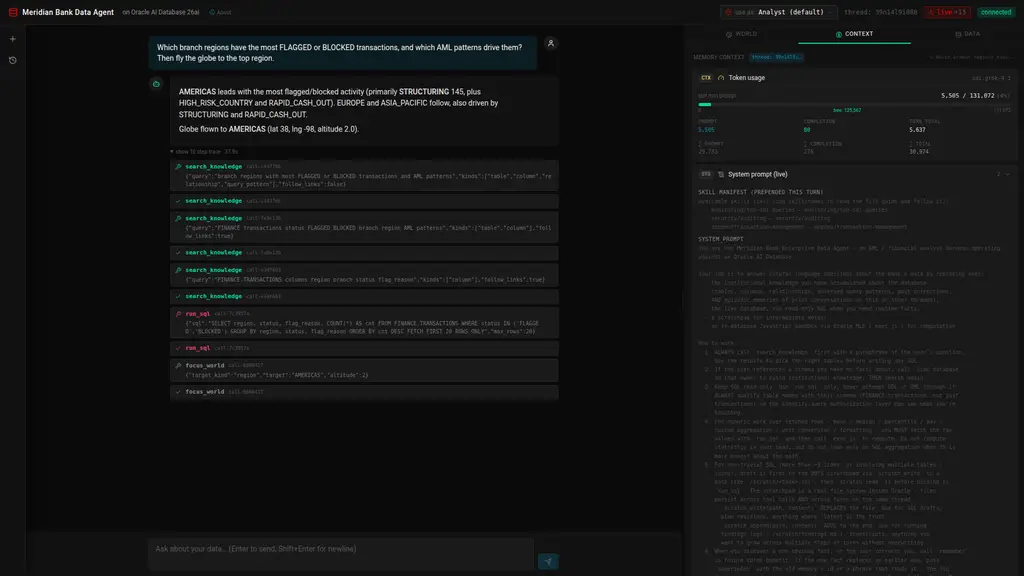
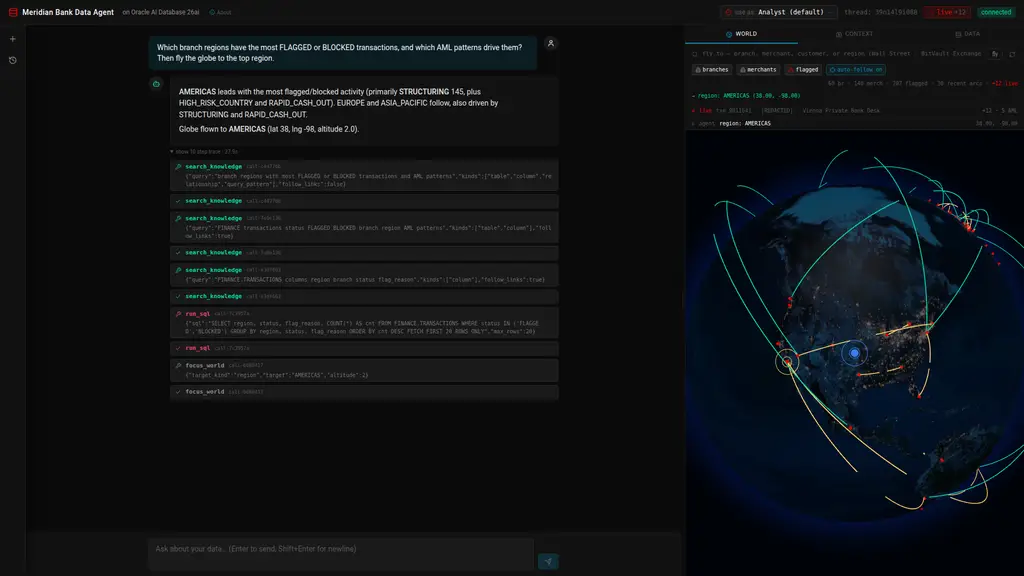 Asking which regions carry the most flagged activity, then telling the agent to fly the globe to the top one. Centre: the grounded answer and the expanded step trace (
search_knowledge, run_sql, focus_world). Right: the World Explorer at the coordinates the agent resolved. The Context tab behind it shows the live Token usage meter, system prompt, recent thread messages, top semantic memories, tool outputs, skill manifest, and tool manifest — all scoped to the active thread.
Demo domain: Meridian Bank, a global retail bank. The FINANCE schema models 60 branches (with SDO_GEOMETRY lat/long) and 140 merchants across four regions (AMERICAS / EUROPE / MIDDLE_EAST / ASIA_PACIFIC), 2,000 customers, 2,650 accounts, ~3,000 cards, ~23,600 transactions over the last 90 days — including deliberately seeded AML patterns (structuring, geographic velocity, high-risk-corridor wires, rapid cash-out, large cash deposits) — plus 900 loans and 117 Suspicious Activity Reports. The AML desk’s paperwork lives beside it: sanctions screenings, beneficial owners, wire messages, login events (with SDO_GEOMETRY locations), KYC documents, case notes and FX rates. The agent answers questions over all of it via SQL, spatial queries (SDO_WITHIN_DISTANCE), in-database compute (Oracle MLE), JSON Relational Duality Views, and identity-aware row/column filtering (DDS / DBMS_RLS).
What this application teaches
This app is a working reference for building a production-shaped agent harness on top of Oracle AI Database 26ai. Every screen and every tool corresponds to a concept you’d otherwise have to assemble from a half-dozen disjoint services. Read it twice and you’ll have a working mental model for shipping enterprise AI agents that don’t leak data, don’t hallucinate schemas, and don’t crumble when a model rejects authentication.
1. The agent harness pattern: Agent = Model + Harness
The chat loop in agent/harness.py (~370 lines of Python) is short enough to read in one sitting. Read it once and you understand the entire control flow: build a context (skill manifest + OAMP context card + retrieved schema facts + persona block), retrieve top-k tools by vector similarity over toolbox, call the LLM, dispatch any tool calls, offload full outputs to OAMP and inline a compact reference back into the prompt, repeat until the model returns plain text or the budget runs out, then guard-stop with a forced finalization. No planner, no router, no sub-agent spawning. The model picks the path; the harness owns state integrity.
You’ll learn:
- Why the harness should “guide the goal, not the path” (system prompt + tool schemas + budget — let the model choose).
- How to keep state integrity out of the model’s hands while still letting it author SQL, run sandboxed JS, and write to a scratchpad.
- How tool-output offloading + truncation markers (
...[+N bytes; full: fetch_tool_output(tool_call_id='...')]) keep context windows manageable across long threads. - How to structure a tool-call loop so the LLM can transparently fall back across regions and models mid-turn (Grok Phoenix → Grok Chicago → gpt-oss-120b on rate limits — see
agent/llm.py).
2. Identity-aware authorization (the “Use As:” selector)
The trust boundary follows the end user, not the database connection. Pick a persona in the header and the same SQL returns different data:
| Persona | Clearance | Regions | Effect |
|---|---|---|---|
agent (default) |
STANDARD | all | financials masked + admin tables forbidden |
cfo |
EXECUTIVE | all | full financial visibility; SAR_REPORTS still forbidden |
compliance.officer |
EXECUTIVE | all | full visibility, and the only persona that can read SAR_REPORTS |
analyst.east |
STANDARD | EUROPE + MIDDLE_EAST | regional row filter + amounts masked |
analyst.west |
STANDARD | AMERICAS + ASIA_PACIFIC | regional row filter + amounts masked |
ops.viewer |
STANDARD | all | customer + SAR tables forbidden + account/card ids and amounts masked |
You’ll learn:
- The enforcement runs in the database, not in the view.
db/deep_security.pyprobes the instance and drives the strongest backend it has: Oracle Deep Data Security (CREATE DATA GRANT) on a 26ai Enterprise-class instance, orDBMS_RLS(VPD) row and column policies where it doesn’t — which is the case on the 26ai Free image this demo ships on.api/identities.pyis the single source of truth for both, andscripts/setup_deep_security.py --ddl-onlyemits the Deep Sec migration toapp/scripts/out/deep_sec_ddl.sql. - How to wire identity through both the data explorer (REST) and the chat agent: every read runs on a private READ ONLY
AGENTsession (db.deep_security.identity_session) that callsAGENT.set_eda_ctxbefore it executes, so the kernel decides which rows and columns come back. A per-call session — not the shared connection — is what stops one request’s persona bleeding into a concurrent one. The Python post-filters stay in place as defence in depth and become no-ops once the database has already answered correctly. A per-turnthreading.localcarries the end user. - How to make denials useful: when the agent hits a forbidden table, it tells the user the persona name, the missing privilege, and which higher-clearance persona would unblock the query. No generic “access denied” — every denial is grounded in a named role.
- The starter-prompt “expected: denied” chips on the welcome mat let you click straight into a deny path so you can see the boundary in action.
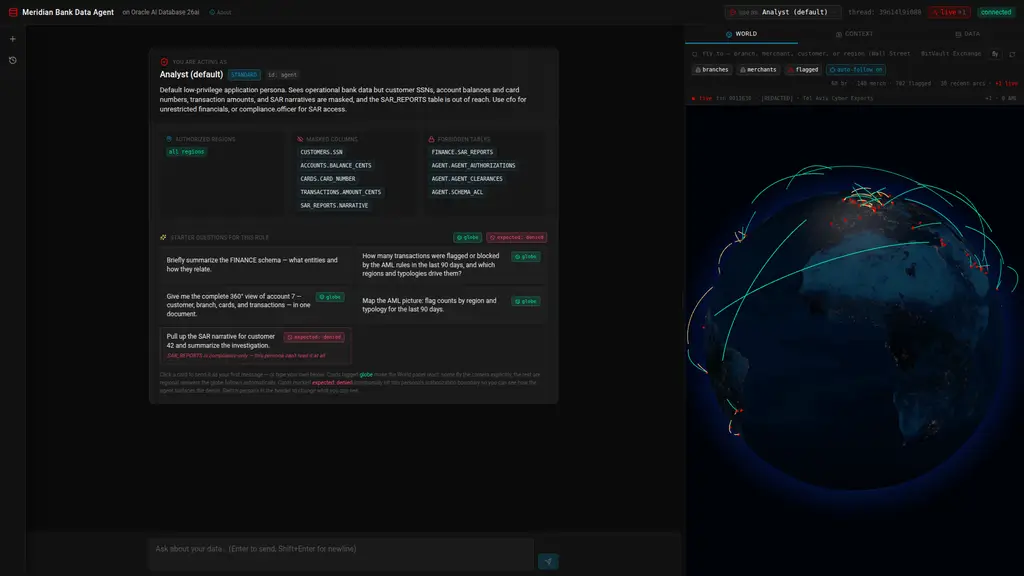 Welcome mat shown on every fresh thread: the active persona’s clearance, authorized regions, masked columns, and forbidden tables are visible at a glance. Every starter card is verified to return real rows for that persona, so a first run never lands on an empty answer:
 globe cards drive the World Explorer, and the red expected: denied card is calibrated to hit this persona’s authorization wall (here, the default Analyst asking for a SAR narrative — SAR_REPORTS is compliance-only, and the kernel drops the rows). Switch persona from the header chip and the entire mat redraws.
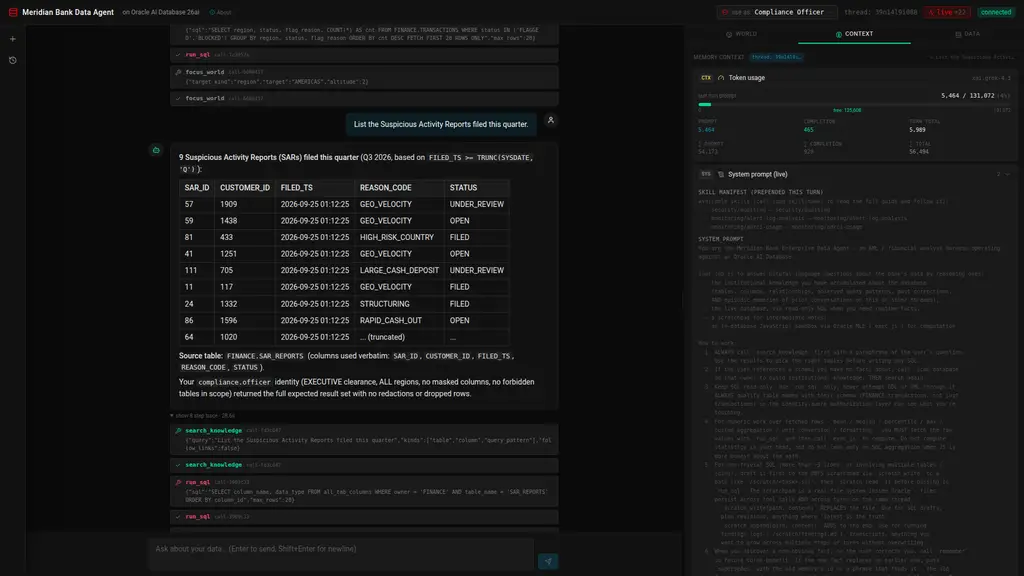 The same SQL, a different persona: as
 compliance.officer the SAR query returns the quarter’s reports, and the answer states why — “EXECUTIVE clearance, ALL regions, no masked columns, no forbidden tables in scope”. Switch back to the default Analyst and the identical question returns zero rows, because DBMS_RLS (or Deep Data Security) answered before the application saw anything.
3. The Oracle AI Database 26ai primitive set, in one app
The harness is deliberately built from primitives the database already ships, so you can read each integration end-to-end:
| Concept | Implementation surface |
|---|---|
VECTOR(384, FLOAT32) columns |
toolbox, skillbox, OAMP-managed memory tables |
HNSW vector indexes (ORGANIZATION INMEMORY NEIGHBOR GRAPH) |
toolbox_emb_v, skillbox_emb_v, OAMP indexes |
vector_memory_size pool |
db/vector_pool.py, scripts/bootstrap.py allocates 512M |
| In-database ONNX embeddings | DBMS_VECTOR.LOAD_ONNX_MODEL of all-MiniLM-L12-v2, queried via VECTOR_EMBEDDING(... USING :t AS DATA) |
| Cross-encoder reranker (optional) | Same DBMS_VECTOR.LOAD_ONNX_MODEL mechanism + PREDICTION(reranker USING :q AS DATA1, doc AS DATA2) |
VECTOR_DISTANCE(..., COSINE) |
top-k retrieval in every tool/skill/memory query |
| Oracle MLE (JavaScript in the kernel) | agent/mle.py wraps DBMS_MLE.CREATE_CONTEXT/EVAL/IMPORT_FROM_MLE; agent uses it for percentiles, stats, unit conversions |
| DBFS (Database File System over SecureFile LOBs) | db/dbfs.py — POSIX-like scratchpad mounted at /scratch, scoped per-thread |
| JSON Relational Duality Views | account_dv and customer_dv (created in db/seed_finance.py); agent reads via tool_get_document / tool_query_documents |
| Oracle Spatial | SDO_GEOMETRY columns, MDSYS.SPATIAL_INDEX_V2, SDO_WITHIN_DISTANCE, SRID 8307 (WGS84) |
DBMS_SCHEDULER |
periodic schema rescans: the job enqueues scan_history rows, and the backend’s drain loop (start_drain_loop in db/scheduler_setup.py) processes the queue every 60 s |
DBMS_RLS + application context (VPD) |
db/deep_security.py — capability probe, persona→policy projection, and the installer in scripts/setup_deep_security.py |
Deep Data Security (CREATE DATA GRANT) |
same module, deep_sec_ddl() — generated for 26ai Enterprise-class, not executable on Free |
| Agent Memory Deep Data Security (OAMP >= 26.8) | same module — UserOwnRows + GlobalMemories policies over the OAMP store via the SDK; runtime identity via OracleMemoryEndUserSecurityContext |
| Memory relations (OAMP >= 26.8) | memory/manager.py + retrieval/scanner.py — typed links between memories (supersedes, supports, contradicts, …), a schema graph linking column facts to table facts, and link-following retrieval |
You’ll learn how each primitive composes with the others — e.g., a duality view’s row filter inherits the underlying-table DDS policy automatically, so an analyst.east user reading account_dv for an AMERICAS account just gets nothing back.
4. Memory architecture: OAMP + thread isolation + provenance
The Oracle AI Agent Memory Package (oracleagentmemory) owns long-term semantic memory. The harness layers thread-scoping and provenance on top:
- Threads, memories, context cards — three OAMP primitives that replace half a dozen hand-rolled tables. The store’s managed objects are named by
memory_store_id="EDA_ONNX"(EDA_ONNX_MEMORY,EDA_ONNX_THREAD, …). - Kernel-scoped memories (OAMP >= 26.8, Deep Sec databases) —
UserOwnRowsDeepDataSecurityPolicy+GlobalMemoriesDeepDataSecurityPolicyput the memory store under data-role/data-grant enforcement, andOracleMemoryEndUserSecurityContextattaches the acting end user to every memory read/write. On the shipped 26ai Free container this layer is probed and reported byscripts/setup_deep_security.py, not faked; there, thread scoping remains the runtime boundary. - Memory relations — corrections supersede the fact they replace (OAMP retires the old memory),
link_memoriesconnects facts the agent already knows, and the scanner links every column/relationship fact to its table fact withsupports. Retrieval can follow one hop (search_knowledge(follow_links=True)), so a retired fact stays reachable as history instead of vanishing. The right pane renders the relations under each memory. - Auto-extraction — every few messages, OAMP’s background worker runs the configured LLM (Grok-4 in the current
.env) to mine durable facts (marked$agent_memory.extraction_idin their metadata, distinct from the harness’s ownkind=memories) and refresh a rolling thread summary. The harness tolerates auth failures here so a bad LLM config never takes down chat. - Concurrency — the app runs on real OS threads (Socket.IO
threadingmode, no monkey-patching) because OAMP’s extraction worker needs its own asyncio loop. OAMP isn’t thread-safe, somemory/manager.pywraps the client (and its thread objects and store) in a proxy that serialises every call behind one app-wideOAMP_LOCK(like the notebook’s_OAMP_LOCK; never held across an LLM call), and gives the client its own connection pool so the background worker never shares a session with foreground calls. - Thread-scoped scratchpad — every
scratch_writelands at/scratch/threads/<thread_id>/<path>; two threads writingfindings.mdcannot collide. Verified in the data explorer’s DBFS tab (each row carries itsTHREAD_IDcolumn). - Episodic memory —
(user, assistant)pairs from each turn are stored as OAMP memories taggedkind=episodicwith theirthread_id. - Tool-output memory — every tool call’s full output is stored once and referenced by
tool_call_id; the agent recovers viafetch_tool_output(tool_call_id=...). - Provenance tags on the right pane — semantic memories carry a
scopechip (this thread/from <other-thread>/global) so you can see which were first written on this thread vs. carried over.
You’ll learn how to scope per-thread state hard (scratchpad, episodic) while keeping institutional knowledge (tool_remember writes) globally retrievable but provenance-tagged.
5. Tool patterns: registry, retrieval, dispatch
Tools live in two parallel structures:
toolbox— callable function specs.@registerdecorator introspects each tool’s docstring + signature and writes the row with an in-DBVECTOR_EMBEDDINGfor retrieval. Per turn,retrieve_tools(query, k=6)does cosine + optional rerank, then merges in an always-on set (run_sql,search_knowledge,remember,link_memories,exec_js,load_skill,scratch_*,search_tavily,focus_world).skillbox— prose markdown playbooks ingested fromoracle/skills. The agent gets a top-3 manifest (just names + one-liners) prepended to its system prompt, and pulls a full body on demand viaload_skill(name).
You’ll learn:
- The semantic-tool-retrieval pattern that scales to dozens of tools without bloating the per-turn token bill.
- The two-stage skill pattern (manifest + on-demand load) that keeps prompts lean while still exposing detailed playbooks.
- How
@registerwrites the embedding inline via SQLMERGE, so adding a tool is a single-decorator operation.
6. Live web access: Tavily as a tool
search_tavily(query, max_results, topic) gives the agent real-time web/news. The pattern is:
- Search news → 2. Extract entities (countries, sectors, merchant categories, regions) → 3. Cross-reference via
run_sqlagainst FINANCE → 4. Summarize with both URL citations and data hits.
Each result is also persisted into OAMP as kind=web_search memories so future turns can recover them via search_knowledge without re-querying. This tool is opt-in: it needs TAVILY_API_KEY, so it is deliberately absent from the welcome-mat starter cards — those are all answerable from your own data with no optional keys, and live headlines are non-deterministic enough to derail a timed demo. Ask for news in your own words once the key is set.
7. Chat-driven UI control: focus_world (and automatic follow)
The agent isn’t just a backend — it can drive the UI. focus_world(target_kind, target, altitude) resolves a branch / merchant / customer / region to lat/lng and emits a Socket.IO focus_world event with source="explicit". The World Explorer panel:
- Auto-surfaces the World tab when the globe is about to move, so the canvas is mounted and the camera-move command lands cleanly.
- Shows a “resolving…” banner while the SQL resolves, then switches to “agent flew the globe → Wall Street (NYC) (branch · 40.71, -74.01)” once the coordinates arrive.
- Calls
globe.pointOfView({lat, lng, altitude}, 1500)and pulses a ripple at the anchor.
The globe also follows the agent automatically. After each run_sql / get_document / query_documents call the backend reads a geographic anchor out of the result — a REGION column, LATITUDE/LONGITUDE, a branch code / city / merchant, or an account’s home branch — and streams a focus_world event with source="auto". A region named in the user’s question focuses immediately, before the first tool runs. Auto events are deduped and capped (4 per turn) so a wide scan can’t thrash the camera, and the panel’s auto-follow toggle (persisted per browser) mutes them while leaving explicit calls working. A live activity strip shows what the agent is looking at right now.
You’ll learn how to plumb an agent tool through to live front-end state via a per-turn set_request_socket(socketio, sid) context, without coupling tool implementations to the API layer.
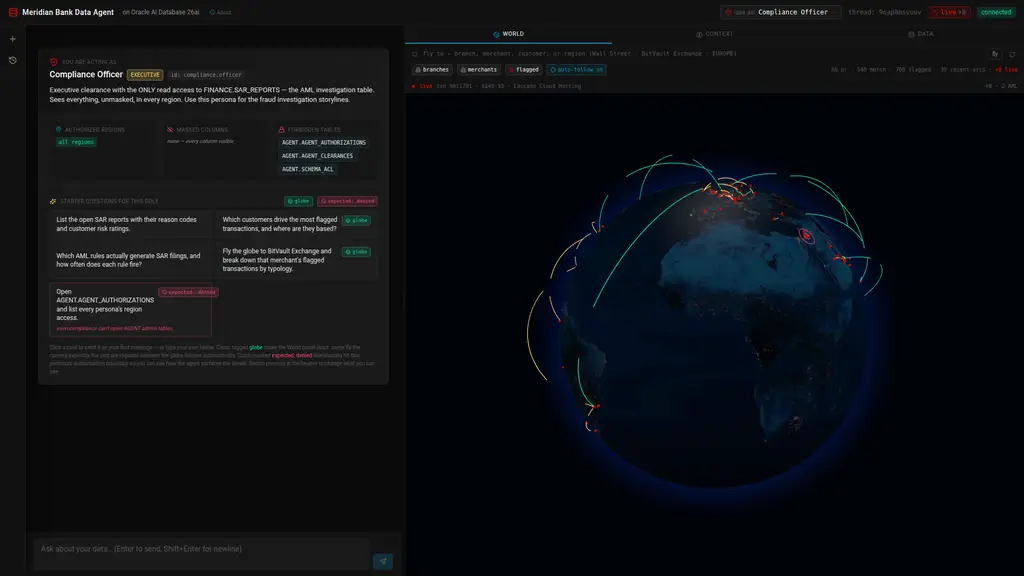 World Explorer renders the FINANCE data as a Palantir-style 3D globe — branches, merchants, and the suspicious-activity layer: recent FLAGGED / BLOCKED transactions plotted at their merchant, with arcs colour-coded by AML flag reason from the account’s home branch. The search bar resolves branch codes/names, merchant names, customer names, or regions; clicking
 fly pans the camera. It reads the same identity filter as every other pane — switch to analyst.east and only EUROPE + MIDDLE_EAST features render.
8. Live data feed — a production feel
The app can also simulate the bank operating. db/live_feed.py runs a background thread that inserts new transactions on a diurnal Poisson schedule — LIVE_FEED_INTERVAL is the peak-hour mean gap (6 s), scaled down by hour-of-day (quiet overnight) and by a weekend factor, with occasional 3–5 event bursts (LIVE_FEED_BURST) — mostly ordinary card activity, ~35% fresh AML hits (STRUCTURING, GEO_VELOCITY, HIGH_RISK_COUNTRY, RAPID_CASH_OUT, LARGE_CASH_DEPOSIT) — and broadcasts each over Socket.IO as live_txn. A share LIVE_FEED_SPOTLIGHT (60%) of the flagged events instead replays a case the autonomous triage captured: the event lands on that customer’s own account, carrying the case’s typology, size and block outcome, so the globe and the AML panel tell the same story. The World panel:
- Pulses a marker at the merchant (or the account’s home branch for the cash rules) and draws a home-branch → merchant arc for each new hit.
- Flashes the arrival — white-hot, thicker, faster for ~2.2 s with a ring ping at the destination — then cools into its AML colour while the halos already on the globe keep gliding; intensity thereafter tracks age (45 s half-life), and the oldest halo dissipates when an 11th arrives.
- Runs a radar sweep and a live ticker naming the latest transaction.
- Ticks a live counter (
+N live) in the header and the toolbar.
The globe stays legible under load, and the live layer is built to be watched rather than rebuilt. Every live halo is checkpointed by transaction id (the liveArcs registry in WorldExplorer.jsx): the arc objects outlive a data update, and three-globe keys its layers by datum reference, so the same line — and the dash phase animating inside it — stays alive. A new hit therefore never restarts the halos already gliding, which is what used to happen when every update rebuilt the whole array. The newest LIVE_ARC_MAX (10) stay in flight, each one’s pulse intensity is its recency (exponential decay, 45-second half-life, ~3-minute life), and the halo pushed out dissipates over ~1.8 s instead of being cut mid-glide. A brand-new hit is unmistakable: white-hot and thicker for its first 2.2 s, its comet running fast, with a birth ping ringing at its destination. The fetched arcs from /api/world (WORLD_ARC_LIMIT, default 10 of the ~160 in the 120-day window) get the same object-stability treatment — otherwise they would re-animate on every live event.
The feed is bounded and self-cleaning: live rows use a reserved txn_id range (≥ 9,000,000), are capped (LIVE_FEED_MAX, default 300) and expire (LIVE_FEED_TTL_MIN, default 25 min), so the curated seed data is never touched. It respects identity on the client — a persona only plots events in its authorized regions, and masked amounts render as [REDACTED]. Toggle it live from the header live / paused pill, or disable it entirely with LIVE_FEED=false.
Because the rows land in FINANCE.TRANSACTIONS, the agent sees them too — ask “how many flagged in the last 90 days?” twice and the number has moved. That is the point: an AI agent with real-time access to its data.
9. The autonomous AML desk — a captured Grok run, replayed live
The Autonomous tab turns the agent outward: instead of answering questions, it works the bank’s AML alert queue. The queue is the data — every (customer, typology) group of FLAGGED / BLOCKED transactions in the last 30 days, the aggregation from notebook §6.1.
The honest constraint: an autonomous loop that decides is a metered loop — the captured morning below cost 6 model round-trips and 29,309 tokens across three alerts. A workshop cannot spend that per attendee, so agent/aml_capture.py holds one real Grok-4.3 run (executed 2026-09-29) verbatim — its queries, rationales, confidences, next actions, even the §6.4 recap answer — and agent/aml_replay.py replays it. Nothing in the replay is invented.
Work the queue starts a sweep (Socket.IO aml_sweep_run):
| Step | What streams to the panel | Where it comes from |
|---|---|---|
| Evidence pack | ALERT / RULE / QUEUE / flagged txns / surrounding activity / accounts / 30-day flow / prior SARs |
Assembled live from FINANCE, notebook §6.2’s queries |
| Tool call | search_knowledge with its arguments and the lines it returned |
The captured call, at its captured latency |
| Model call | model call · xai.grok-4.3 |
The captured latency (22–24 s; the whole sweep lands within a second of the recorded 89 s) |
| Decision | ESCALATE / KYC_REVIEW / DISMISS + confidence + rationale + next action + SAR code |
The captured reply, verbatim |
| Record | an AGENT.AML_REPLAY row (run id, decision, mode, elapsed, tokens) |
Written by the sweep |
Alerts the capture has no decision for replay the same step shape and take the harness’s own fallback — REVIEW_REQUIRED, confidence 0.0, “no validated model reply captured” — and the card reads no capture → human review rather than captured. Ordering prefers captured pairs so a demo sweep actually shows decisions (AML_QUEUE_PREFER_CAPTURE=false restores pure recency). The tab also offers recall the morning: the §6.4 call where the agent answers questions about its own triage run from memory — 16.2 s, no SQL.
The boundary survives the replay: the sweep never writes to FINANCE and never touches AGENT.AML_TRIAGE — that table is the genuine capture, and both it and the replay ledger are browsable in the Data Explorer. Feeding the loop is db/live_feed.py’s spotlight (LIVE_FEED_SPOTLIGHT, 60%): flagged live events land on the captured cases’ own accounts, carrying the case’s typology, size and block outcome, so the globe, the queue and the triage story all point at the same customers. Set LIVE_FEED_SPOTLIGHT=1 for an all-captured demo; AML_REPLAY_SPEED scales the replay (1 = the real timings, 0.05 = one sweep in seconds).
One deliberate seam: the decision is a record while the evidence pack is assembled now, so the txns and totals can differ from the ones the recorded rationale cites (a live feed keeps adding activity). The decision card says so. That is what replaying a real run means.
10. Operational legibility (the right-side pane and bottom panels)
Every input the model received is visible:
- System prompt (live) — exactly what’s prepended this turn, including the dynamic skill manifest.
- Recent thread messages — last 10 messages OAMP knows about for this thread.
- Top semantic memories — what
search_knowledgewould surface for the latest query, with provenance chips. - Episodic memories — past
(user, assistant)exchanges from this thread. - Recent tool outputs — the last 8 tool dispatches on this thread, full preview + truncation marker.
- DBFS scratchpad — current thread’s working files, paths shown without the physical thread prefix.
- Skill manifest / Tool manifest — top-3 / top-6 entries the agent saw this turn.
- Token usage — live
prompt / completion / turn-totalagainst the model’s max context, plus thread cumulative — fills in real time as the loop iterates.
 The Context tab mid-thread: last-turn prompt vs. model-max, per-turn completion and thread totals, then the exact system prompt prepended this turn — including the dynamically retrieved skill manifest. Below it come the sections this same pane renders for every turn: recent thread messages, top semantic memories, recent tool outputs, and the tool manifest.
The Data Explorer at the bottom mirrors the FINANCE schema (and the agent’s own bookkeeping tables, including the synthetic DBFS.scratchpad virtual table) with identity-aware row filtering and column masking. Tabs pulse with a colour-coded chip (READ blue / SCAN green / WRITE amber) when the agent touches them — driven by tables_touched Socket.IO events that the harness emits inline with each tool dispatch.
The World Explorer renders the spatial layer of the same data (branches, merchants, flagged-transaction activity dots, and home-branch → merchant arcs) with the same identity filter applied — switch to analyst.east and only Europe + Middle East features render.
You’ll learn how to make an agent’s reasoning auditable by showing exactly what entered its prompt, exactly what tools it dispatched, and exactly what data those tools returned — without baking that observability into the agent’s own logic.
11. Provider routing and graceful degradation
agent/llm.py builds the shared ModelRouter from oci_key_rotation.py (also used by the notebook). It walks an ordered chain of lanes:
grok-phx—LLM_MODEL(defaultxai.grok-4.3) onOCI_GENAI_ENDPOINT, keysOCI_GENAI_API_KEY…_6.grok-chi— same model onOCI_GENAI_FALLBACK_ENDPOINT, keysOCI_GENAI_FALLBACK_API_KEY…_6.gptoss-chi—OCI_GENAI_BACKUP_MODEL(defaultopenai.gpt-oss-120b) on the Chicago endpoint.
Lanes whose env is missing are skipped (no fallback env = Phoenix only). Grok limits are per tenancy per region, so on a rate limit (429) the lane is put on cooldown (OCI_GENAI_FALLBACK_COOLDOWN_S, default 120 s) and the next lane serves the call immediately; after the cooldown the next call tries Grok in Phoenix again. Auth errors (401/403) rotate keys inside the lane, transient errors get one retry then the next lane, and other errors (400…) raise at once. If every lane is limited, the last lane is retried with backoff rather than locking the user out.
Switches are silent: the token meter always shows the primary model. Each event is appended as a JSON line to OCI_GENAI_ROUTER_LOG (default ~/.cache/fraud-workshop/llm-router.log) and printed as one [llm-router] … line on the server console. The OAMP memory-extraction LLM shares the same router instance, so there is one cooldown state per process. config.py still normalizes the endpoint (/openai/v1) and splits multi-key strings.
You’ll learn how to ship an agent that doesn’t go dark when a provider has a bad day, and how to make .env parse-resilient so a typo doesn’t take down the harness.
12. The “boring on purpose” closing note
The whole thing is ~10,000 lines of Python and ~4,300 lines of React (the harness loop itself is ~370). The app itself uses no agent framework — no LangChain, no AutoGen, no LlamaIndex — just python-oracledb, oracleagentmemory, openai, and the OpenAI-compatible OCI endpoint. (The notebook shows the LangChain interop in §3.6 — OracleEmbeddings + OracleVS over the same store — because plenty of teams arrive with a LangChain app; the harness in this folder deliberately does not need it.)
Browser (React SPA)
  ├─ Header                  -- thread id, connection status, "new thread"
  ├─ ThreadList (left)       -- OAMP threads, click to switch
  ├─ ChatPane (center)       -- message bubbles + streaming tool-call trace
  └─ InstrumentPanel (right) -- World (globe + live feed) · Context · Data ·
                                Autonomous (the captured AML triage replay)

WebSocket + REST (Socket.IO)
  ├─ send_message            -- runs one turn of the agent loop, streams tool events
  ├─ new_thread              -- mints a thread id
  ├─ request_context_window  -- on-demand context refresh
  ├─ live_txn / live_feed_*  -- the simulated bank feed (diurnal Poisson arrivals)
  ├─ aml_sweep_run / aml_*   -- the autonomous AML sweep (queue, steps, decisions)
  └─ /api/threads, /api/context/<thread_id>, /api/world, /api/health (pings Oracle; 503 + "degraded" if it does not answer)

Flask API (Python · Socket.IO threading mode)
  ├─ agent/harness.py        -- the notebook's §5.3 loop, with the skill manifest prepended (§4.4)
  ├─ agent/tools.py          -- search_knowledge · run_sql · exec_js · remember ·
  │                             scan_database · load_skill · list_skills
  ├─ agent/skills.py         -- skillbox (Oracle skills repo ingestion)
  ├─ agent/mle.py            -- exec_js via DBMS_MLE
  ├─ agent/aml_capture.py    -- the captured Grok triage run (pure data)
  ├─ agent/aml_replay.py     -- replays it over the live alert queue; AGENT.AML_REPLAY
  ├─ memory/manager.py       -- OAMP client + in-DB ONNX embedder
  ├─ retrieval/scanner.py    -- notebook §2.4 scanner, condensed
  ├─ db/live_feed.py         -- the simulated bank: diurnal Poisson inserts + spotlight
  └─ api/{routes, events, context}.py

python-oracledb (thin)
  └─ Oracle AI Database 26ai (Docker, same as the notebook)
        ├─ AGENT schema       -- toolbox, skillbox, OAMP-managed memory tables
        └─ FINANCE schema -- branches / merchants (SDO_GEOMETRY) /
                                 customers / accounts / cards /
                                 transactions / loans / sar_reports + account_dv / customer_dv (JSON DVs)
Prerequisites
- A running Oracle Free container (the app expects
oracle-freeonlocalhost:1521/FREEPDB1; override viaORACLE_DSNif different) - Python 3.11+
- Node.js 18+
- OCI GenAI credentials (
OCI_GENAI_API_KEY); optional Chicago fallback keys (OCI_GENAI_FALLBACK_API_KEY)
The app no longer requires the notebook to have been run — scripts/bootstrap.py handles every prerequisite that the notebook used to set up.
In the Codespace all of this is automatic. .devcontainer/provision.sh runs on container create and again on every start, probing each layer (AGENT schema + ONNX embedder, the FINANCE seed + duality views + skillbox, the Oracle Text index, the identity rules) and running only the script whose layer is missing. bash .devcontainer/provision.sh --probe-only prints what it finds; the four scripts below are the manual path. Run by hand, seed.py drops and recreates FINANCE, which wipes its RLS policies — always follow it with setup_deep_security.py (the provisioner does: the policy probe fails after a reseed, so identity is reinstalled).
Setup
cd app

# Configure env
cp .env.example .env
# edit .env — at minimum set OCI_GENAI_API_KEY

# Backend
python -m venv .venv
source .venv/bin/activate
pip install -r backend/requirements.txt

# Frontend
cd frontend && npm install && cd ..
Bootstrap (idempotent, requires SYSDBA + container access)
python scripts/bootstrap.py
Walks through six steps:
- Create the
AGENTuser with every grant the harness needs (CONNECT, RESOURCE, MLE, DBFS, MINING MODEL, V$SQL/V$SQLSTATS catalog access). ALTER SYSTEM SET vector_memory_size = 512M SCOPE=SPFILE CONTAINER=ALL.- If the running instance hasn’t picked up the pool, auto-bounce the container (
docker restart $ORACLE_CONTAINER, defaultoracle-free) and wait for FREEPDB1 to come back. Pass--no-bounceto skip and bounce yourself. - Stage + register the
ALL_MINILM_L12_V2ONNX embedder (~117 MB download, copies into the container,DBMS_VECTOR.LOAD_ONNX_MODEL). - Create the DBFS scratchpad (tablespace + store + mount at
/scratch). - Create empty
toolboxandskillboxtables inAGENT.
After this you have an Oracle that’s ready for the agent. No notebook required.
Seed (destructive: resets FINANCE)
python scripts/seed.py
Populates the demo data on top of the bootstrap:
- Drops + recreates the
FINANCEschema (60 branches + 140 merchants withSDO_GEOMETRY, 2,000 customers, 2,650 accounts, ~3,000 cards, ~23,600 transactions incl. AML patterns, 900 loans, 117 SAR reports, + the AML operational tables) and gathers optimizer statistics - Creates
account_dvandcustomer_dvJSON Relational Duality Views - Scans the schema into OAMP institutional knowledge
- Ingests
oracle/skillsinto the skillbox (~165 markdown skills at last count; the repo moves)
Re-runnable to reset the demo dataset, but not idempotent: it drops FINANCE (RLS policies and live-feed rows included), so run setup_deep_security.py afterwards.
Identity rules (idempotent; re-run after any reseed)
python scripts/setup_deep_security.py             # probe + install
python scripts/setup_deep_security.py --demo      # + same-SQL/different-persona proof
python scripts/setup_deep_security.py --ddl-only  # write the Deep Sec DDL, touch nothing
Probes the instance, seeds the persona rule tables, and installs the 15 DBMS_RLS policies on FINANCE — or writes the equivalent CREATE DATA ROLE / CREATE END USER / CREATE DATA GRANT DDL when Deep Data Security is available. Safe to re-run: it clears the policies it owns before reinstalling, so re-running this script never leaves stale state. Deep dive: docs/reference/deep-data-security.md.
Run
Two terminals:
# Terminal 1 — backend
cd app/backend && python app.py
# → backend ready on http://localhost:8000

# Terminal 2 — frontend
cd app/frontend && npm run dev
# → http://localhost:3000
Open http://localhost:3000. Send a message. Watch the right pane fill in.
What you should see
Chat pane (center):
- User bubbles right, assistant bubbles left.
- While the agent is thinking, each tool dispatch shows up as a bubble (
search_knowledge,run_sql,exec_js,load_skill, …) with the args. Bubbles flip to a checkmark when the tool returns. - Final assistant message renders markdown (tables, code blocks).
- Click the small “show N step trace” link below the assistant bubble to expand the full trace.
Memory context pane (right):
The main sections (the Context tab renders a few more), each populated after every turn:
| Section | What’s in it |
|---|---|
MSG Recent thread messages |
Last 10 turns from OAMP for this thread |
MEM Top semantic memories |
What search_knowledge(query) would surface — the agent’s institutional knowledge ranked by similarity to the latest query |
TOOL Recent tool outputs |
Outputs of the last several tool calls on this thread (the same data fetch_tool_output recovers) |
SKILL Skill manifest |
Top-3 from the skillbox — exactly what’s prepended to the system prompt this turn |
REG Tool manifest |
Top-6 tool schemas actually exposed to the LLM this turn (after vector retrieval + always-on merge) |
This pane answers the question: “why did the model say what it said?” — every input that landed in its context is on the right.
Starter prompts
Drop these into the chat to exercise different parts of the harness:
| Prompt | Exercises |
|---|---|
| “What’s in the FINANCE schema? Briefly list the entities and relationships.” | scanner-built institutional knowledge (Part 2) |
| “Which branch regions have the most FLAGGED or BLOCKED transactions?” | run_sql + simple aggregation |
| “Which merchants are within 1500 km of Dubai right now?” | SDO_WITHIN_DISTANCE against merchants.location |
| “Pull every FLAGGED transaction’s amount and use exec_js to compute the mean and median in dollars.” | run_sql → exec_js (Oracle MLE) |
| “Give me the complete document for account 7 — customer, branch, cards, transactions. Use the duality view if there is one.” | get_document("account_dv", "7") (JSON Relational Duality) |
| “Show me all transactions flagged as STRUCTURING in EUROPE.” | query_documents("account_dv", where=...) + DDS (amounts masked unless EXECUTIVE) |
| “How do I diagnose ORA-00904? Consult any guide you have.” | load_skill("agent/ora-error-catalog") from the skillbox |
| “List the Suspicious Activity Reports.” | identity gates at the kernel: 0 rows as agent, all 117 as compliance.officer |
Notes
- The agent runs as
AGENT_USERwith whatever grants you’ve given it.tool_run_sqlis read-only (its session is opened READ ONLY, and a denylist rejects dynamic-SQL packages andFOR UPDATE). Identity is enforced by the database:tool_run_sqland the Data Explorer each take a private session fromidentity_sessionand callAGENT.set_eda_ctxon it before executing, so theDBMS_RLSpolicies installed byscripts/setup_deep_security.pyscope every query. Set the persona in the header and the same SQL returns different rows — you never setEDA_CTX.END_USERyourself. - ⚠️ The VPD backend is fail-open: with no end-user context set, every policy predicate evaluates to
1=1and all rows are visible. Deep Data Security (Enterprise-class 26ai) is default-deny. That gap is the honest caveat of this demo — seedocs/reference/deep-data-security.md. - The two JSON-relational duality views (
account_dv,customer_dv) are read-only; theget_documentandquery_documentstools call them throughagent_connso the kernel-level row/column policies on the underlying tables apply transparently to the JSON output. - Spatial queries use SRID 8307 (WGS84).
branches.locationandmerchants.locationare both indexed (MDSYS.SPATIAL_INDEX_V2). - WebSocket transport only (Socket.IO
transports: ["websocket"]); CORS is open during dev because Vite proxies/apiand/socket.ioto the backend. - The skillbox ingestion downloads a tarball from
api.github.com/repos/oracle/skills/tarball/main. No GitHub auth needed.