Create and Manage Resources in Azure (Greenfield Workflow)
Step 1:
Choose the excel sheet template from Excel Templates.
Fill the Excel with appropriate values and copy at /cd3user/azure/<prefix>
Copy CD3 Excel File
-
While using the container launched using RM Stack, local path
/cd3user/mount_pathon the VM is mapped to/cd3user/inside the container. So the Excel template can be copied at/cd3user/mount_path/azure/<prefix>/on the VM. Below is the sample command to copy the Excel template from local system to container: -
Note that the user
cd3usercan be used to connect to the VM because same key is pushed foropcas well ascd3user.
Step 2:
Modify /cd3user/azure/<prefix>/<prefix>_setUpAzure.properties.
Update parameters: cd3file parameter to the location of CD3 excel file and workflow_type to create_resources as shown below.
The other parameters are already updated with correct values.
[Default]

#Input variables required to run setUpAzure script

#path to output directory where terraform file will be generated. eg /cd3user/azure/<prefix>/terraform_files
outdir=

#prefix for output terraform files eg demo
prefix=

# Auth Params
subscription_id=

tenant_id=

client_id=

client_secret=

#path to cd3 excel eg /cd3user/azure/<prefix>\CD3-Customer.xlsx
cd3file=

#specify create_resources to create new resources in Azure(greenfield workflow)
#specify export_resources to export resources from Azure(non-greenfield workflow)
workflow_type=create_resources
Step 3:
Execute the setUpCloud.py script to start creating the terraform configuration files.
Command to Execute:
Example Execution
See below image for DB @Azure create options. You could select either of the options or choose to create ADB and ExaData together.
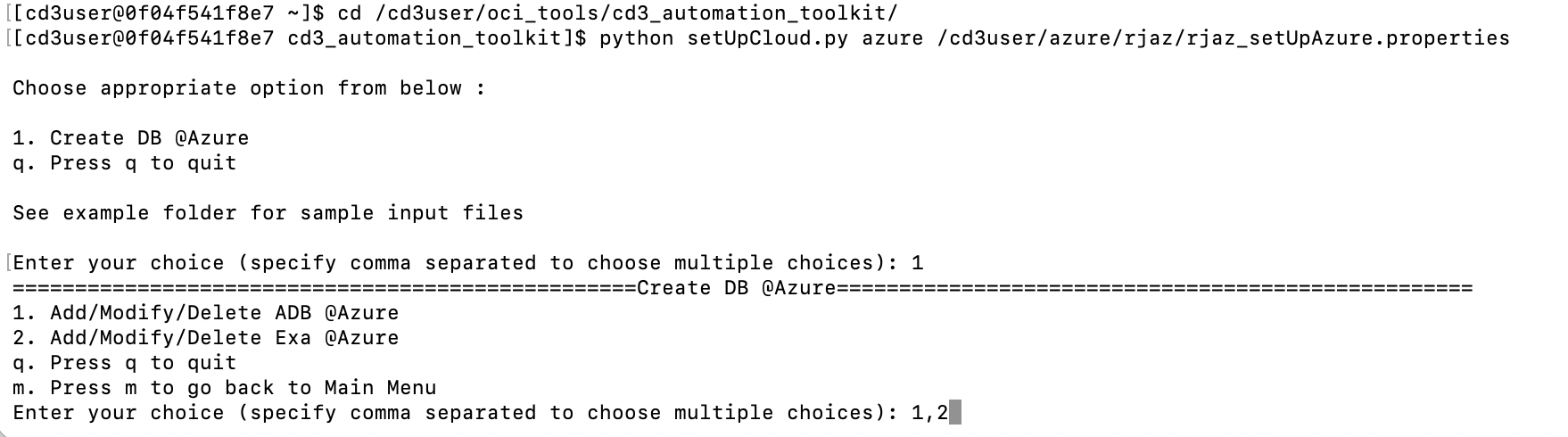
Choose the resources by specifying a single option (for choosing one of these resources) or comma-separated values (to choose multiple resources) as shown in the sample screenshot above.
Expected Outputs:
The tfvars files for the selected services will be generated at the following path:
/cd3user/azure/<prefix>/terraform_files/
Step 4:
Change the directory to /cd3user/azure/<prefix>/terraform_files/ .
Note
Azure Cloud@DB Terraform execution uses the Azure Verified Module Azure/avm-res-network-virtualnetwork/azurerm version 0.17.1. This third-party module enforces its own Terraform runtime requirements.
Before running terraform init, plan or apply, ensure that the Terraform executable in the selected execution environment satisfies the requirements published for the pinned AVM module version. CD3 does not override third-party module compatibility constraints.
Offline Excel-to-tfvars generation is not affected.
-
Execute:
terraform init- To initialize and prepare the working/out directory so Terraform can run the configurationterraform plan- To preview any changes before applying themterraform apply- To make the changes defined by Terraform configuration to create, update, or destroy resources in Azure