oracle-ai-developer-hub
Part 4: The Toolbox and Skillbox Patterns
The agent needs a way to do things in the world — execute SQL, run code, write to a scratchpad, fetch a document. In this harness:
| Concept | Lives in | Consumed as |
|---|---|---|
| Tool | toolbox table (vector-indexed) |
OpenAI-style function call, dispatched by the loop |
| Skill | skillbox table (vector-indexed) |
Prose markdown the model reads on demand |
Both use the same retrieval primitive — vector search over an in-database HNSW index — but they are surfaced differently. Tools are dispatched (the loop runs them); skills are read (the loop inlines a manifest, the model decides whether to load the body).
Why Vector-Indexed Tools?
If the registry has 6 tools, it’s harmless to put them all in every LLM call. Once you have 30+ tools (per-system MCP servers, per-team helpers), the model starts confusing them and the per-turn token bill grows linearly with the registry. Indexing tools by an embedding of name + description + arg names lets us pass only the relevant top-k for a given user query.
We still always include a small always-on set. In the notebook that is run_sql, search_knowledge, remember and load_skill; the app adds link_memories, exec_js and the DBFS scratchpad tools, because its turns lean on them constantly. They’re cheap, and the agent calls them on almost every turn.
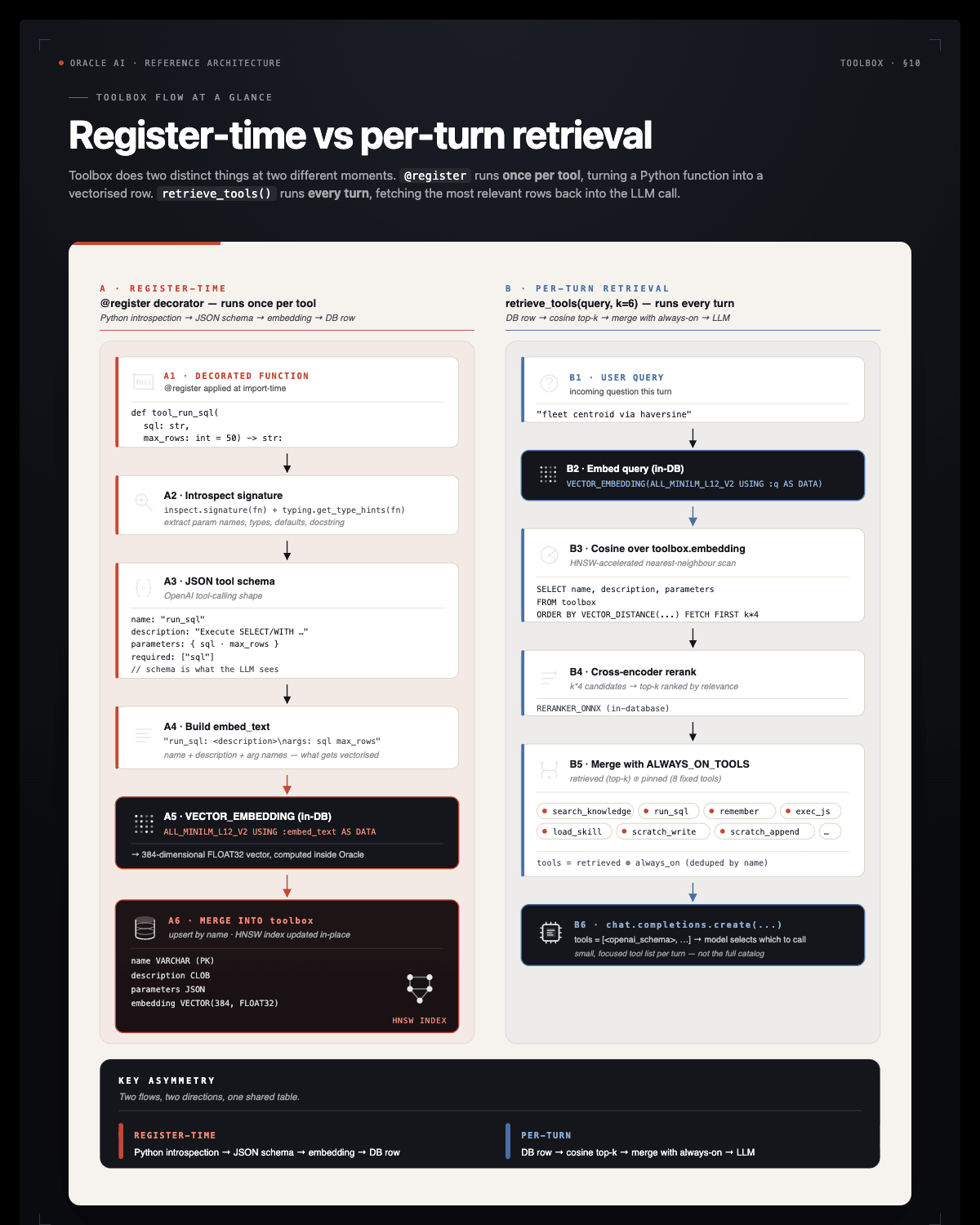
The @register decorator (§4.1)
make_registry in workshop/tools.py returns (TOOLS, ALWAYS_ON_TOOLS, register). @register is argument-less: it introspects the function and records it in two places.
TOOLS: name →(callable, OpenAI function schema).build_schema(fn)readsfn.__name__(atool_prefix is dropped),fn.__doc__and the type hints.- The
toolboxrow:upsert_toolbox_rowMERGEs name, description, parameters and an embedding computed in the database withVECTOR_EMBEDDING(ALL_MINILM_L12_V2 ...)from"{name}: {description}\nargs: {arg names}". Re-registering a tool updates the row in place.
Every tool needs a docstring: it is the text that gets embedded and the description the model sees.
TODO 5: retrieve_tools
§4.1. Rank the toolbox rows by cosine distance to the query, rerank the shortlist, then add the always-on tools so the model never loses the core set.
The cell gives you _TOOL_SQL (closest tools first: VECTOR_DISTANCE between each stored tool embedding and the embedding the database makes of :q, first :n rows), the rows list, the rerank call and the final return (names from best plus ALWAYS_ON_TOOLS, deduplicated with dict.fromkeys, mapped to TOOLS[name][1]). You write one line: cur.execute(_TOOL_SQL, q=query, n=k * 4), where :q is the question and :n = k * 4 fetches extra candidates for the reranker.
Solution:
_TOOL_SQL = ("SELECT name, description FROM toolbox ORDER BY VECTOR_DISTANCE(embedding, "
             f"VECTOR_EMBEDDING({ONNX_EMBED_MODEL} USING :q AS DATA), COSINE) FETCH FIRST :n ROWS ONLY")

def retrieve_tools(query, k=6):
    with agent_conn.cursor() as cur:
        cur.execute(_TOOL_SQL, q=query, n=k * 4)
        rows = [{"name": n, "content": wt.lob_text(d)} for n, d in cur]
    best = rerank(query, rows, top_k=k, content_key="content")
    return [TOOLS[n][1] for n in dict.fromkeys([r["name"] for r in best] + sorted(ALWAYS_ON_TOOLS)) if n in TOOLS]
The checkpoint right after retrieve_tools runs before any tool is registered, so it checks the return type and that every schema belongs to TOOLS. The tool_run_sql checkpoint then verifies that run_sql is retrievable.
TODO 6: tool_run_sql
§4.2. run_sql is the agent’s way to query live data. It must be read-only: SELECT and WITH only. _READ_ONLY is pre-defined:
_READ_ONLY = re.compile(r"^\s*(select|with)\b", re.IGNORECASE)
The read-only check, the try/except (any database error comes back as {"error": "..."}) and the cursor with are given. You write two lines inside the with: cur.execute(sql) and return wt.rows_json(cur, max_rows), which gives {"columns": [...], "rows": [...], "row_count": N}.
Solution:
@register
def tool_run_sql(sql: str, max_rows: int = 50) -> str:
    """Execute a READ-ONLY SQL statement (SELECT/WITH only) against the Oracle AI Database and return up to `max_rows` rows as JSON."""
    if not _READ_ONLY.match(sql.strip()):
        return json.dumps({"error": "only SELECT / WITH statements are allowed in run_sql"})
    try:
        with agent_conn.cursor() as cur:
            cur.execute(sql)
            return wt.rows_json(cur, max_rows)
    except Exception as e:   # any database error goes back to the agent as JSON
        return json.dumps({"error": str(e)})
The core toolset (§4.3)
§4.3 registers these tools beyond tool_run_sql. The app adds the rest.
| Tool | What it does | Where |
|---|---|---|
scan_database(owner) |
Run the Part 2 scanner against a schema; append facts, links and a scan_history row. |
notebook |
search_knowledge(query, k, kinds) |
Semantic search over the agent’s long-term memory (retrieve_knowledge). |
notebook |
remember(subject, body, kind, supersedes) |
Persist a correction or learning; supersedes retires the earlier fact it replaces. |
notebook |
link_memories(source, target, link_type, reason) |
Connect two memories the agent already knows (supports/contradicts keep both current). |
notebook |
load_skill(name) |
Read a skill body from the skillbox. | notebook |
fetch_tool_output(tool_call_id) |
Recover a tool output that the loop replaced with a truncation marker (§5.5). | notebook |
list_skills(query) |
Discover a skill by meaning (tool_list_skills, TODO 7). |
notebook |
focus_world(target_kind, target, altitude) |
Resolve a branch, merchant, customer or region to a globe anchor; the app emits the camera move. | app |
exec_js(code) |
JavaScript inside Oracle MLE (reference). | app |
merchants_near(place, radius_km) |
Oracle Spatial: merchants within a radius of a branch city (SDO_WITHIN_DISTANCE). |
app |
account_document(account_id) |
One account as a nested JSON document (duality views). | app |
scratch_write(path, content) / scratch_read(path) / scratch_append(path, content) |
DBFS scratchpad I/O (reference). | app |
The notebook’s search_knowledge takes (query, k, kinds); the app’s variant adds follow_links=True, which asks OAMP for one hop of linked context per hit.
Skills: Procedural Memory for How to Do Things
The toolbox answers “what can the agent call?” — function specs, dispatched as tool_calls. The skillbox answers a different question: “what does the agent know how to do?” — prose playbooks the model reads as part of its context.
Two procedural-memory tables, parallel structures:
toolbox |
skillbox |
|
|---|---|---|
| Holds | Callable function specs | Prose markdown playbooks |
| Consumed as | tools=[...] parameter — dispatched |
Text in context — read |
| Per-turn injection | Top-k schemas + always-on | Top-k names + 1-line desc (manifest) |
| Full content | n/a (functions just run) | load_skill(name) returns the body |
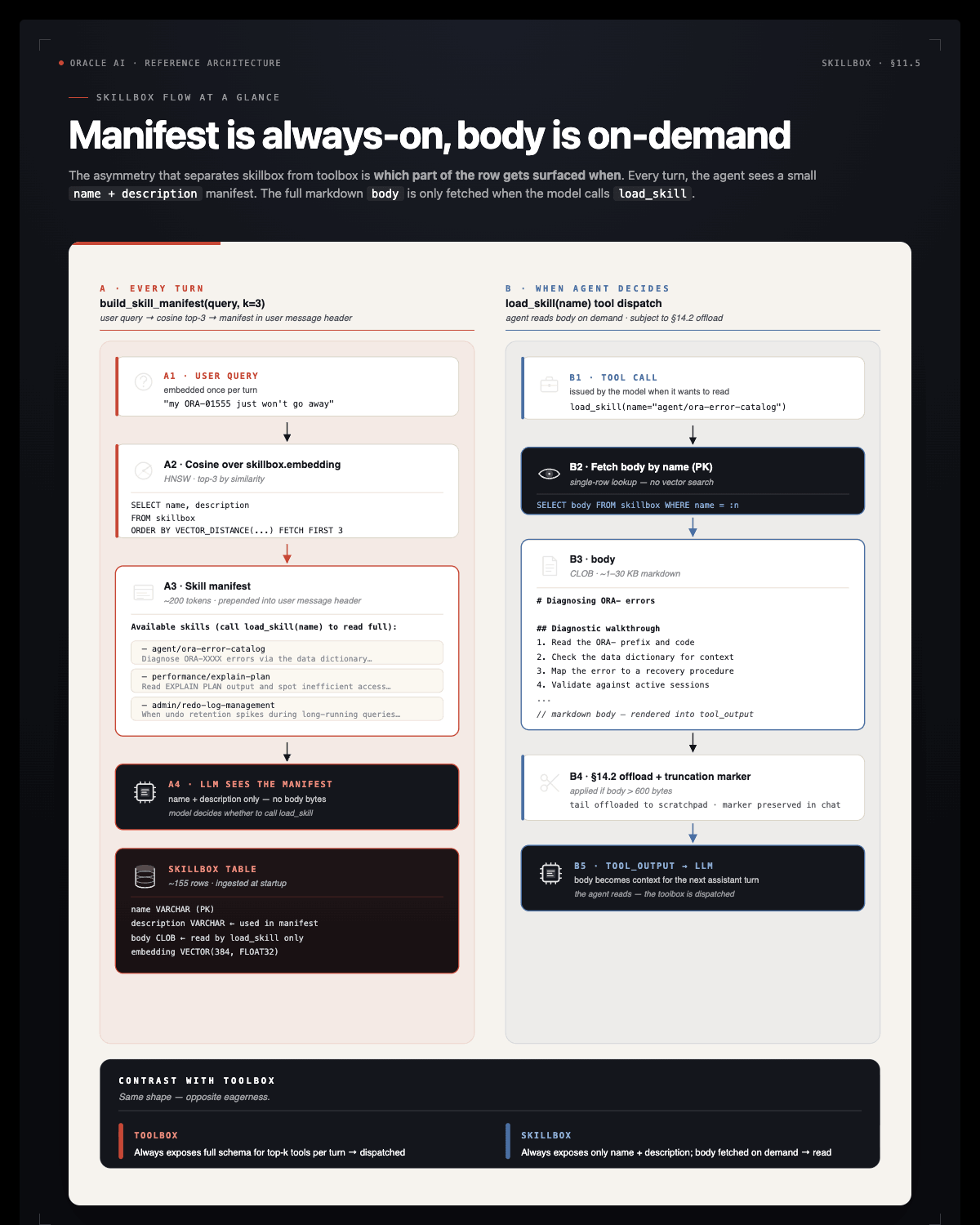
Source: oracle/skills/db. Oracle publishes a curated library — 100+ guides organized by category (agent, performance, security, plsql, sqlcl, …). Each .md file is a skill: an H1 title, a first-paragraph description, and a body of prose + SQL examples.
The provisioning scripts mirror them into skillbox with their content SHA, so re-ingestion is idempotent. Injecting every skill body into every prompt would cost far too many tokens. Instead:
- The manifest (top-3 skill names + descriptions, each description cut to 240 characters) is prepended to every prompt by
build_skill_manifest. - The full body is one
load_skill(name)tool call away.
The model sees the menu without paying for the meal.
TODO 7: tool_list_skills
§4.4. load_skill(name) reads a skill body once the model knows the name. tool_list_skills(query, k) is the discovery half: cosine search over skillbox.embedding, the same primitive as the toolbox lookup.
The cell gives you _SKILL_SQL (closest skills first, :q = search text, :k = row count), the hits list (one {"name", "category", "description"} dict per row) and the final json.dumps(hits). You write one line, the same pattern as TODO 5: cur.execute(_SKILL_SQL, q=query, k=k).
Solution:
_SKILL_SQL = ("SELECT name, category, description FROM skillbox ORDER BY VECTOR_DISTANCE(embedding, "
              f"VECTOR_EMBEDDING({ONNX_EMBED_MODEL} USING :q AS DATA), COSINE) FETCH FIRST :k ROWS ONLY")

@register
def tool_list_skills(query: str, k: int = 5) -> str:
    """Search the skillbox semantically. Returns top-k skills (name + description)."""
    with agent_conn.cursor() as cur:
        cur.execute(_SKILL_SQL, q=query, k=k)
        hits = [{"name": n, "category": c, "description": wt.lob_text(d)} for n, c, d in cur]
    return json.dumps(hits)
The checkpoint (wt.check_skill_search) searches the populated skillbox and fails on the stub and on trivial empty results.
The globe tool: focus_world (app only)
The app registers one more tool, worth calling out because it returns a place instead of rows.
The app renders a World Explorer globe from GET /api/world in app/backend/api/world_routes.py — a dot per branch, a dot per merchant, and a red dot plus an arc per FLAGGED / BLOCKED transaction. focus_world(target_kind, target, altitude) lets the model move that camera:
target_kind |
Resolves against | Example |
|---|---|---|
branch |
branch code, name, or city | Wall Street, Dubai |
merchant |
merchant name or category | BitVault Exchange |
customer |
full name, anchored at their oldest account’s branch | Isabella Allen |
region |
one of the four bank regions | EUROPE |
Why it is a tool. Look at what the tool actually is: a SELECT that turns a name into a (lat, lng), plus a payload shape. That’s all. There is no spatial-reasoning layer and no separate geo service. The same branches and merchants rows the agent already queries for answers are the rows that position the map — one source of truth, two renderings. It is the cleanest demonstration in this workshop that a tool is just a function plus a schema, and that @register doesn’t care whether the return value means “rows”, “a document”, or “a place”.
Notebook versus app. In the app the tool also emits a focus_world Socket.IO event that the React WorldExplorer listens for. Read app/backend/agent/tools.py and look for the payload = {...} dict.
Note A customer resolves to a branch, not a location. A bank knows where an account was opened, not where its holder is standing.
_resolve_world_target("customer", ...)therefore anchors at the customer’s primary (oldest) account’s branch — an ordering that exists only inaccounts.opened_ts. Useful domain logic belongs in the tool, not in the prompt.
Key takeaways: Part 4
- Tools are Python callables with embeddings. The
@registerdecorator introspects the function and writes a vector-indexed row. Function name + docstring + arg names are the public spec. - Vector retrieval keeps the prompt lean. With 30+ tools, including all of them every turn confuses the model. Top-k by cosine over the user query exposes only what’s relevant — registry size grows without per-turn cost growing.
- Always-on vs retrieved. Cheap-and-frequent tools (
run_sql,search_knowledge,remember,load_skill; the app addslink_memories,exec_jsand the DBFS tools) ship in every prompt. Specialised tools come from the toolbox lookup. - Tools answer “what can I call?”. Skills answer “what do I know how to do?”. Tools are dispatched as function calls; skills are prose playbooks the model reads.
- A tool can return anything.
run_sqlreturns rows,account_documentreturns a JSON document,focus_worldreturns a place. The registry treats all three identically — name, docstring, args, embedding.
Troubleshooting
ValueError: tool 'tool_run_sql' has no docstring: build_schema requires a docstring. Add one.
@register raises ORA-51962 — The HNSW vector index couldn’t be created. Check vector_memory_size and bounce the DB if needed (see Part 1).
@register succeeds but retrieve_tools returns empty results — Run the cell that registers tools first. Without rows in toolbox, vector search has nothing to retrieve.
focus_world returns no branch found matching ... — The resolver is deliberately literal: branch_code exact-matches, name/city match with LIKE. Use values that exist in the seed — Wall Street, Dubai, BitVault Exchange, Isabella Allen, EUROPE.