oracle-ai-developer-hub
Part 6 — OracleSemanticCache — caching LLM calls
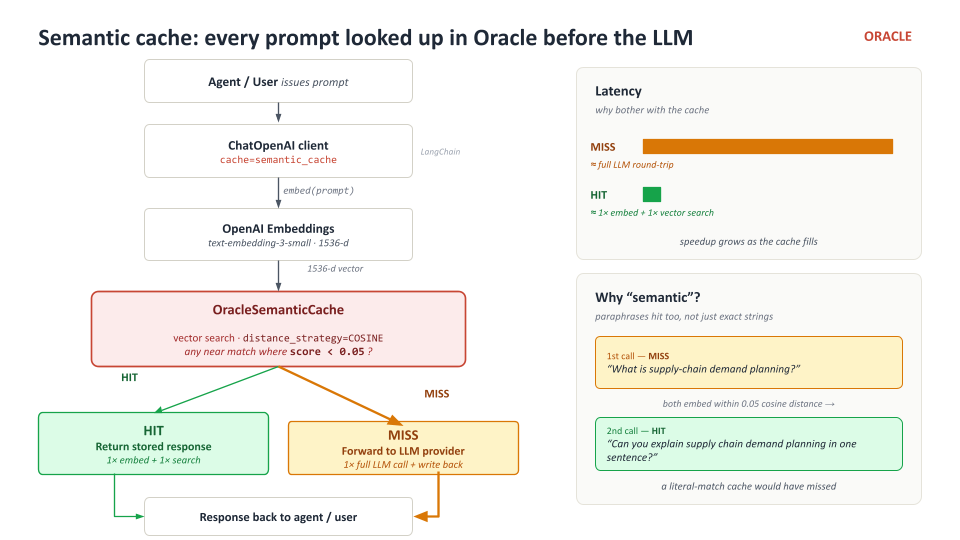
Why semantic caching beats exact-match caching
Traditional caches key by the literal request. Two prompts that ask the same question in slightly different words miss the cache:
"What is supply-chain demand planning?"      ← cache miss
"Define supply-chain demand planning."       ← cache miss (different bytes)
A semantic cache keys by an embedding of the prompt. Two prompts whose embeddings are within a configurable cosine threshold both hit the same cached entry. Paraphrases, capitalisation drift, punctuation — they all collapse to the same response.
How it’s wired
from langchain_oracledb.cache import OracleSemanticCache

semantic_cache = OracleSemanticCache(
    client=oracle_client,                    # same sync Oracle connection
    embedding=embeddings,                    # same in-DB embedder
    table_name="langchain_demand_cache",     # one table per cache scope
    distance_strategy="COSINE",
    score_threshold=0.05,                    # tighter = fewer near-miss false positives
)
score_threshold is the most important knob:
| Threshold | Behaviour |
|---|---|
| Very tight (~0.02) | Only near-exact paraphrases hit. Fewer false positives, more LLM calls. |
| Loose (~0.20) | Anything semantically adjacent hits. More cache hits, but risk of stale-response false positives. |
Start tight, loosen if you see too many redundant LLM calls on truly similar prompts.
Scope — opt-in per chat model, not global
You can install the cache globally with
langchain_core.globals.set_llm_cache(semantic_cache) and every LLM
call in the process will consult it. That’s tempting but rarely what
you want for agents — the supervisor’s intermediate prompts contain
ever-changing context, so cache hit rates plummet and lookup overhead
goes up.
Instead, attach the cache per chat model:
cache_demo_model = ChatOpenAI(
    model=LLM_MODEL,
    cache=semantic_cache,     # ← only this client uses the cache
    **chat_model_kwargs(),
)
That way you can apply the cache to a user-facing FAQ chain while keeping the agent loop uncached.
What you’ll build in TODO 5
A two-call timed demo on the same prompt. The first invocation goes to the LLM and writes a cache entry. The second invocation looks up by embedding similarity, finds the match, and returns the stored response without touching the LLM.
The hard-stop checkpoint asserts that r1.content == r2.content —
if the cache wasn’t connected, the LLM would generate a different
response on the second call and the assertion would fail.
Solution
Drop this into the TODO 5 cell, replacing everything below the existing imports:
import time
from langchain_openai import ChatOpenAI

cache_demo_model = ChatOpenAI(
    model=LLM_MODEL,
    cache=semantic_cache,
    max_tokens=120,
    **chat_model_kwargs(),
)

PROMPT = "In one sentence: what is supply-chain demand planning?"

t0 = time.perf_counter()
r1 = cache_demo_model.invoke(PROMPT)
miss = time.perf_counter() - t0

t0 = time.perf_counter()
r2 = cache_demo_model.invoke(PROMPT)
hit = time.perf_counter() - t0

print(f"first call  (miss): {miss:.2f}s")
print(f"second call ( hit): {hit:.2f}s")
print(f"speedup:           {miss / max(hit, 0.001):.1f}x")
print()
print(r2.content)
What lives in the cache table
langchain_demand_cache (the table you named) holds:
- The embedded prompt (vector column)
- The stringified response payload (JSON / metadata)
- A stable hash of
llm_stringso different model configurations don’t collide
You can inspect it with plain SQL:
SELECT COUNT(*) FROM langchain_demand_cache;
Next
→ Part 7 — Naive vs semantic search — the aha moment for the vector store.