oracle-ai-developer-hub
Part 1 — Setup & connectivity
What this part is for
Bind the configuration the rest of the notebook depends on. There’s no
TODO here — just two cells that pick the LLM provider and open
three Oracle connections. After this part the rest of the workshop
runs against those Python handles, never reading os.environ again.
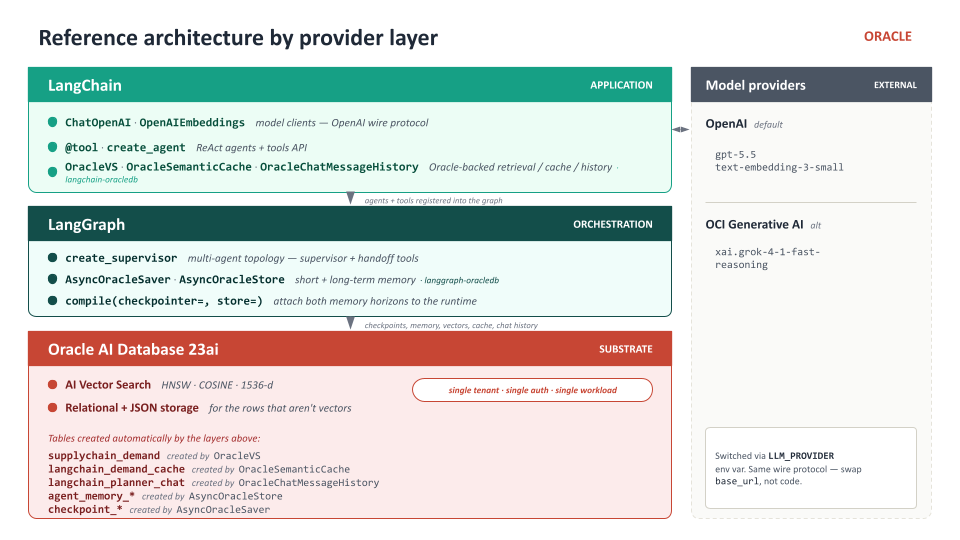
The diagram above maps the three layers we’ll be wiring: LangChain is where the model clients and tools live, LangGraph is where the supervisor and per-thread + cross-thread memory live, and everything they produce — vectors, checkpoints, cache, chat history — lands on Oracle AI Database.
LLM_PROVIDER — OpenAI or OCI
The chat model is provider-aware. Both endpoints speak the OpenAI wire
protocol, so the same ChatOpenAI client works for both — only the
base_url and api_key change.
LLM_PROVIDER |
Required env vars | Default LLM_MODEL |
|---|---|---|
openai (default) |
OPENAI_API_KEY |
gpt-5.5 |
oci |
OCI_GENAI_API_KEY, OCI_GENAI_ENDPOINT |
xai.grok-4-1-fast-reasoning |
A small helper, chat_model_kwargs(), returns the right base_url +
api_key for the active provider so later cells stay provider-agnostic:
agent_model = ChatOpenAI(model=LLM_MODEL, **chat_model_kwargs())
Embeddings are always in-database (Part 2). No external embedding API key required.
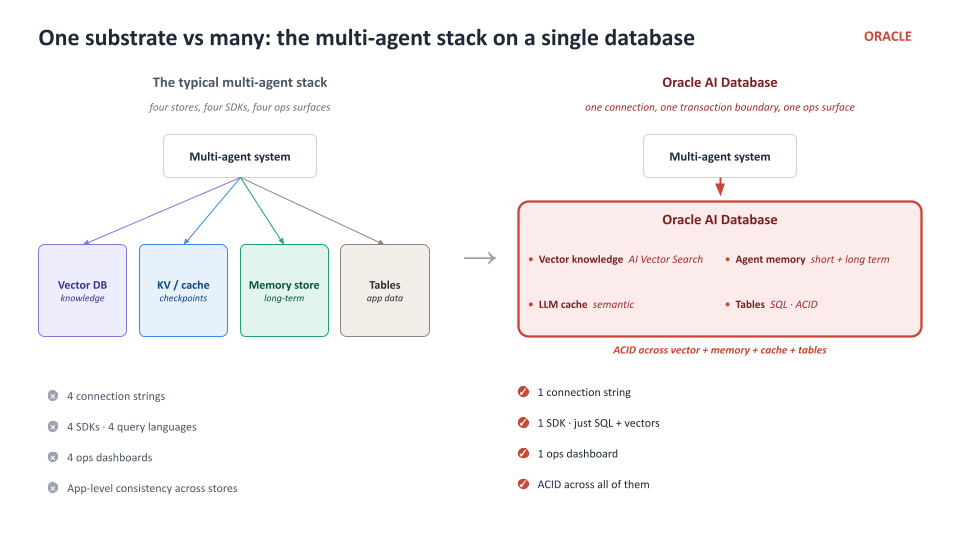
Why three Oracle connections?
oracledb keeps sync and async APIs cleanly separate — you can’t use a
sync Connection with an await and you can’t use an AsyncConnection
with OracleVS.add_texts(...). So we open one of each shape:
| Handle | Type | Used by |
|---|---|---|
oracle_client |
sync oracledb.Connection |
OracleVS, OracleSemanticCache, OracleChatMessageHistory |
saver_conn |
async oracledb.AsyncConnection |
AsyncOracleSaver |
store_conn |
async oracledb.AsyncConnection |
AsyncOracleStore |
All three connect to the same database, with the same AGENT user, in
the same schema. From Oracle’s perspective this is one workload.
What’s already in place when you start
Before the notebook opens, the Codespace ran three scripts in sequence:
app/scripts/bootstrap.py— created theAGENTuser, grantedCREATE MINING MODELetc., setvector_memory_size = 512M.app/scripts/onnx_setup.py— downloadedALL_MINILM_L12_V2ONNX model and loaded it intoAGENTviaDBMS_VECTOR.LOAD_ONNX_MODEL.app/scripts/seed_supplychain.py— pulled a slice ofharisss/Supplychainfrom Hugging Face, aggregated it into 12 demand reports + a policy memo, wrote everything intoOracleVS, and seeded two planner-scoped memories intoAsyncOracleStore.
You’ll consume that pre-built state in Parts 3 and 4.
Next
→ Part 2 — In-DB embeddings — your first TODO: wire OracleEmbeddings.