oracle-ai-developer-hub
🛍️ Semantic Product Search and Visual Discovery with Oracle AI Database (Vector Search)
A multimodal product search demo app that shows how to build semantic search and image-based similarity search on top of Oracle AI Database (Vector Search).
This project demonstrates an end-to-end vector search pipeline using CLIP embeddings, Oracle AI Database for similarity search, a FastAPI backend, and a web UI for text and image queries:
- 🧠 query embeddings for text and images
- ⚡ similarity search in Oracle AI Database (Vector Search)
- 🌐 REST API (FastAPI)
- 🖥️ Web UI for searching products (text / image / filters)
Built as developer enablement content and a demo for Oracle AI Database Vector Search, with support for both cloud and local development environments.
✨ What you can do with this app
- 🔎 Semantic text search (“find similar clothes”, “kids toys”, etc.)
- 🖼️ Image-based product search (visual similarity)
- 🎯 Vector similarity search in Oracle AI Database
- 🗂️ Filter by category & price
- 🧪 Local dev mode for demos & testing
🧠 High-Level Architecture
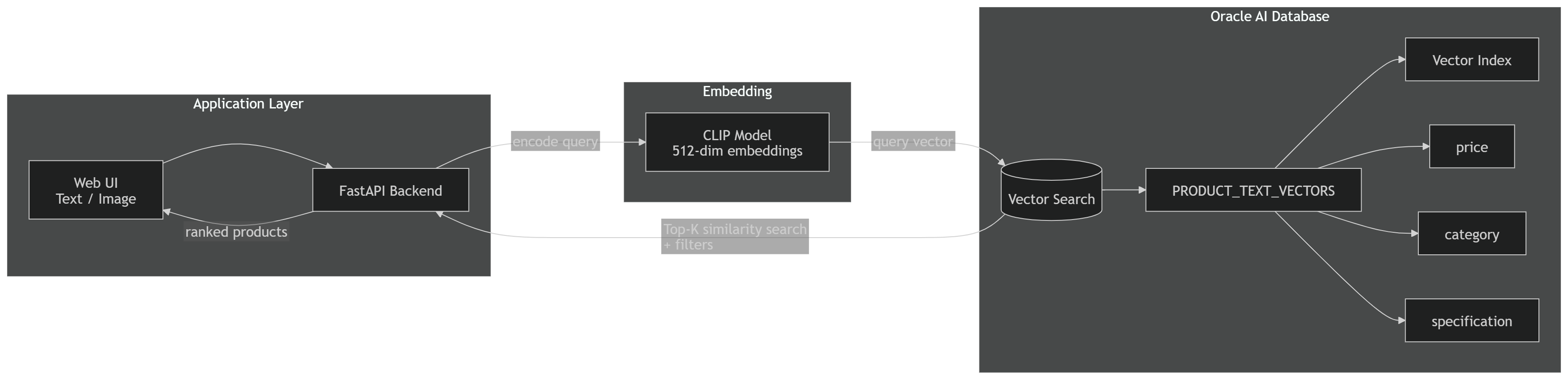 Flow (end-to-end):
1) The user submits a text query or image in the UI.
Flow (end-to-end):
1) The user submits a text query or image in the UI.
2) The backend generates a CLIP embedding (512-dim) for the query.
3) Oracle AI Database runs a Top-K vector similarity search (optionally combined with category/price filters).
4) The backend returns ranked products (title, image, price, category) to the UI.
—
🧠 How Oracle Vector Search powers this app (end-to-end flow)
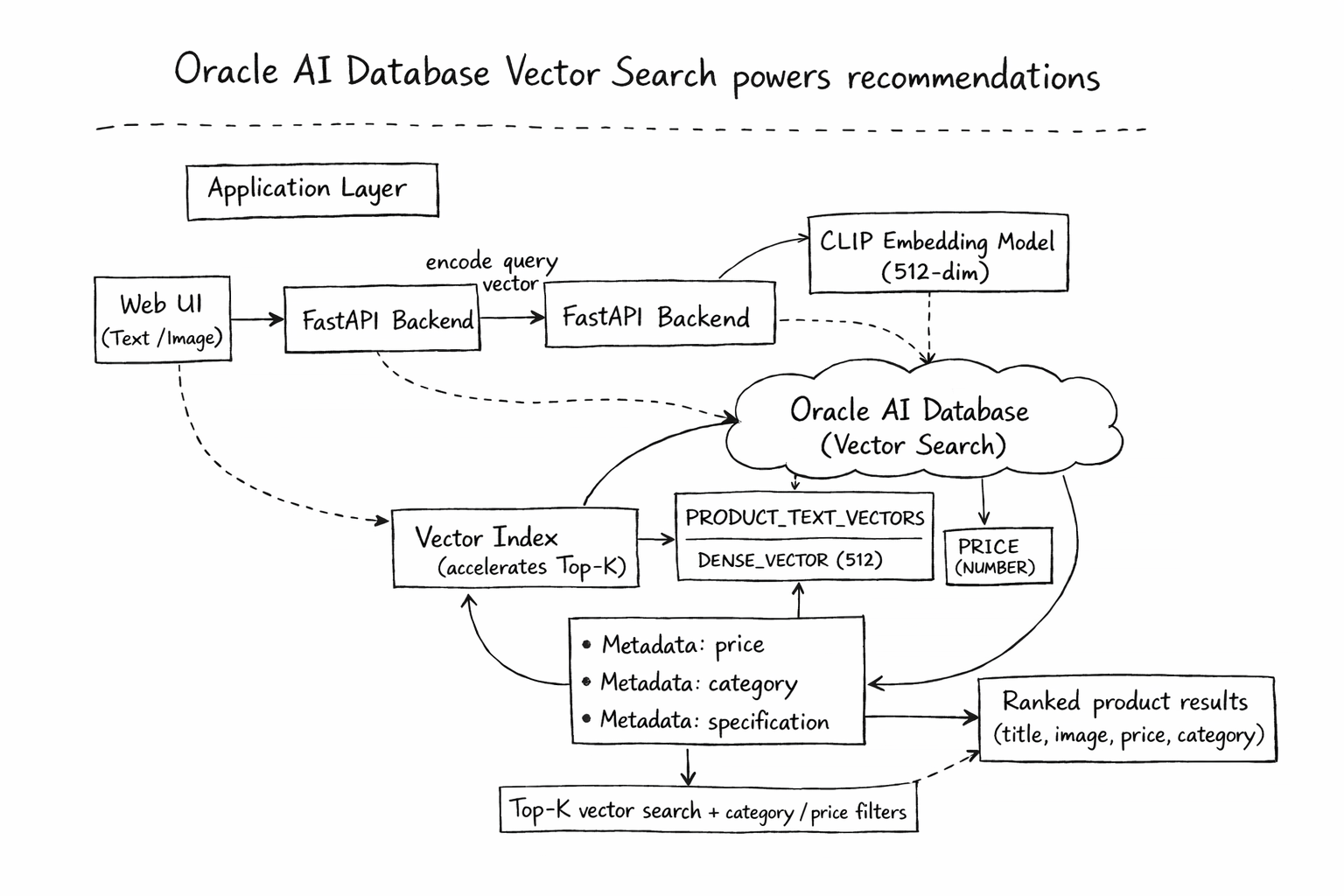
What happens under the hood:
1) The backend generates CLIP embeddings (512-dim) for both product data (ingestion) and user queries (runtime).
2) At query time, Oracle runs a Top-K similarity search (optionally combined with category/price filters) and returns ranked results.
3) Product vectors are stored in an Oracle VecDB table (default: PRODUCT_TEXT_VECTORS) together with product metadata used by the application.
4) The backend returns UI-ready product objects (title, image URL, price, category) to the frontend.
Result: “find products like this” works for both semantic text and visual similarity, not just keyword matching.
🖼️ UI Demo (Screenshots)
Text semantic search
|
Image similarity search
|
Category & price filters
|
Product details
|
🚀 Quickstart (Oracle AI Database)
1️⃣ Backend
cd backend
python -m venv .venv
source .venv/bin/activate
pip install -r requirements.txt

cp .env.example .env
# update VECDB_REST_URL and either VECDB_USERNAME/VECDB_PASSWORD or VECDB_ACCESS_TOKEN
# set VECDB_SELF_SIGNED_SSL=true only for a trusted self-signed development endpoint

python load_dataset.py
uvicorn main:app --host 0.0.0.0 --port 8000
2️⃣ Frontend
cd frontend
npm install
VITE_BACKEND_URL=http://<your_vm_ip_addrs>:8000 npm run dev -- --host 0.0.0.0 --port 5176
☁️ Cloud-first Deployment
This sample is designed to work well with Oracle AI Database environments and can be adapted for common deployment patterns such as:
- Oracle Autonomous Database
- Oracle AI Database (Vector Search enabled)
You can deploy:
- Backend on OCI Compute / container
- Database on Oracle AI Database or Autonomous Database
-
Frontend on static hosting or local dev environment
🧪 Local Development Mode
For demos and local testing, you can also run against:
- Oracle AI Database Free (26ai Free)
- Local Docker / Podman Oracle AI DB container
This enables:
- local testing
- quick iteration
- reproducible demos
📂 Project Structure
product_recommendation/
├── backend/
│   ├── .env.example
│   ├── config.py
│   ├── load_dataset.py
│   ├── main.py
│   └── requirements.txt
├── frontend/
│   ├── src/
│   ├── package.json
│   └── vite.config.ts
├── images/
│   ├── architecture-high-level.png
│   ├── architecture-handdrawn.png
│   ├── ui-text-search.png
│   ├── ui-image-search.png
│   ├── ui-filters.png
│   └── ui-product-details.png
└── README.md
⚙️ Configuration
Backend configuration is loaded from environment variables.
- Copy
backend/.env.exampletobackend/.env - Set:
VECDB_REST_URLVECDB_USERNAMEVECDB_PASSWORD- optionally,
VECDB_ACCESS_TOKEN(takes precedence over username/password)
Optional overrides include:
ORACLE_TEXT_TABLEORACLE_DISTANCE_METRIC
🤖 Embedding Model
- Model:
clip-ViT-B-32 - Library:
sentence-transformers - Source: Hugging Face – clip-ViT-B-32
🔍 Example Usage:
from sentence_transformers import SentenceTransformer

model = SentenceTransformer("clip-ViT-B-32")
Used for text and image embeddings.
🔁 Indexing Pipeline
📚 Dataset
- Name:
ckandemir/amazon-products - Fields Used:
title,description,price,image_url
🛠️ Workflow
- Load dataset
- Generate embeddings from title/description/image
- Store in Oracle VecDB with metadata
🧪 Search Modes Supported
- Text-based semantic search
- Image-based similarity search
- Both support Top-K results + optional price filter
📂 Upload Your Own Dataset (Optional)
If you want to use your own data:
✅ Supported Fields
Product NameDescriptionSelling PriceCategoryProduct SpecificationImage
📥 Steps:
- Save your dataset as
.csvor.json - Update
load_dataset.pyto read your file - Modify embedding logic as needed
- Run
load_dataset.pyto index into Oracle VecDB
📓 Demo Notebook (Oracle AI Developer GitHub / Colab)
Related notebooks are available under notebooks/vecdb/ for end-to-end Oracle VecDB workflows.
🧩 Technologies Used
- Oracle AI Database (Vector Search)
- FastAPI
- CLIP embeddings (sentence-transformers)
- Python
- Vite frontend
-
REST APIs
🧑💻 Developer Enablement Goals
This sample is intended as developer enablement content for Oracle AI Database Vector Search use cases and multimodal search demos.
📄 API Details
Main backend endpoints include:
GET /productsGET /categoriesPOST /searchPOST /image-search