oracle-ai-developer-hub
Supply-Chain Demand Planning Agent
A multi-agent demand-planning assistant on Oracle AI Database. Every memory layer, every retrieval primitive, and every LLM call lands in a single Oracle database — vector knowledge, cross-thread long-term memory, per-thread checkpoints, semantic LLM cache, and chat history all share one connection and one transaction surface.
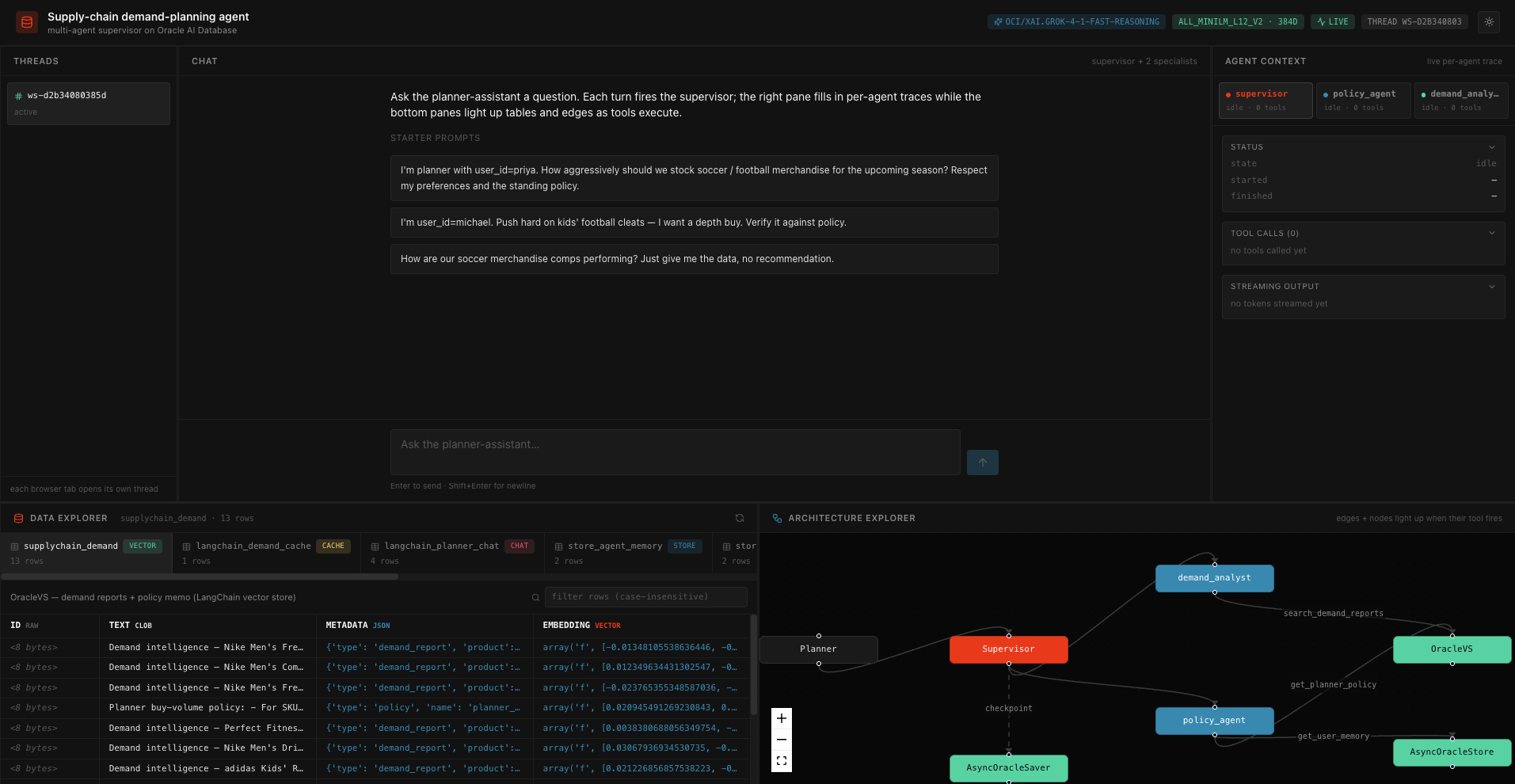
A planner asks a question in plain language. A LangGraph supervisor decomposes the request into work for two specialists — demand_analyst (vector search over historical demand reports) and policy_agent (planner preferences + standing buy-volume policy) — then synthesises a buy recommendation that respects both the policy and the active planner’s saved preferences. The UI shows the chat, a live per-agent trace, the rows backing every tool call, and an animated topology that lights up as tools fire.
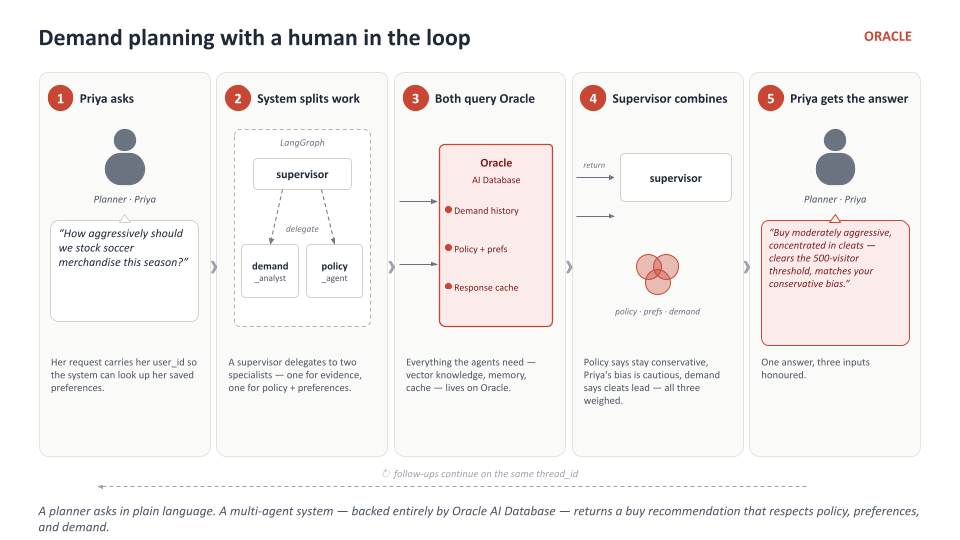
What it demonstrates
| Layer | Primitive | Lives in |
|---|---|---|
| Vector knowledge | OracleVS |
supplychain_demand table — 13 docs (12 demand reports + 1 policy memo) |
| Embeddings | OracleEmbeddings against in-DB ONNX ALL_MINILM_L12_V2 (384 dims) |
No external embedding API; the model runs inside Oracle |
| Long-term memory | AsyncOracleStore (HNSW + COSINE) |
store_agent_memory + store_vectors_agent_memory — namespace-scoped planner preferences |
| Per-thread state | AsyncOracleSaver |
checkpoints + checkpoint_writes + checkpoint_blobs |
| LLM cache | OracleSemanticCache |
langchain_demand_cache — vector lookup by prompt embedding |
| Chat history | OracleChatMessageHistory |
langchain_planner_chat |
| Orchestration | langgraph_supervisor.create_supervisor over two langchain.agents.create_agent specialists |
app/backend/agent/ |
Architecture
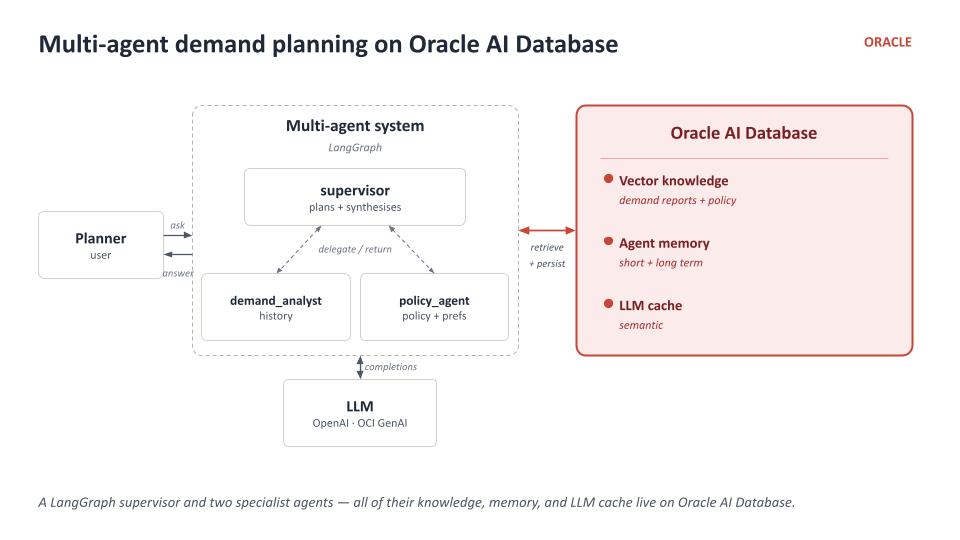
The supervisor plans and synthesises; each specialist runs its own ReAct loop against a focused tool surface; every retrieval path ends in Oracle.
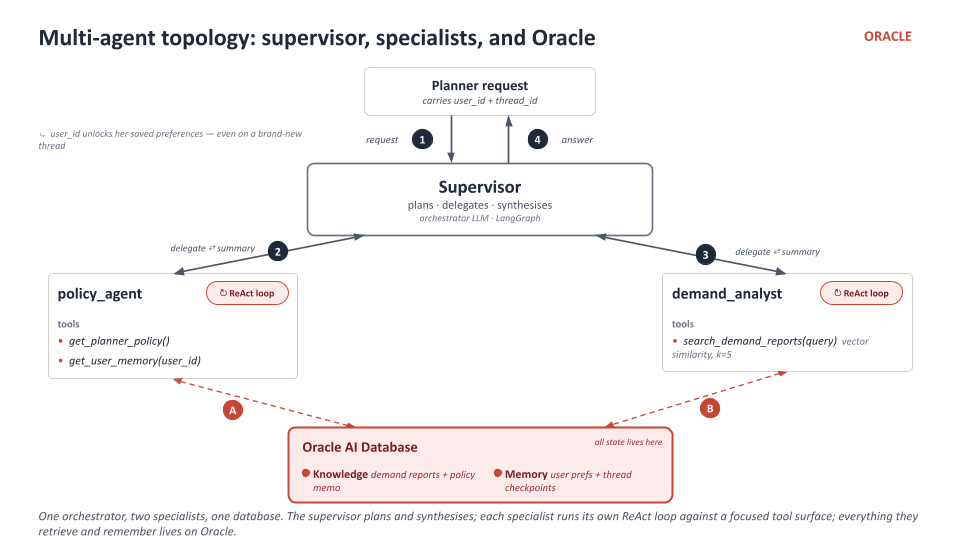
Why a single database
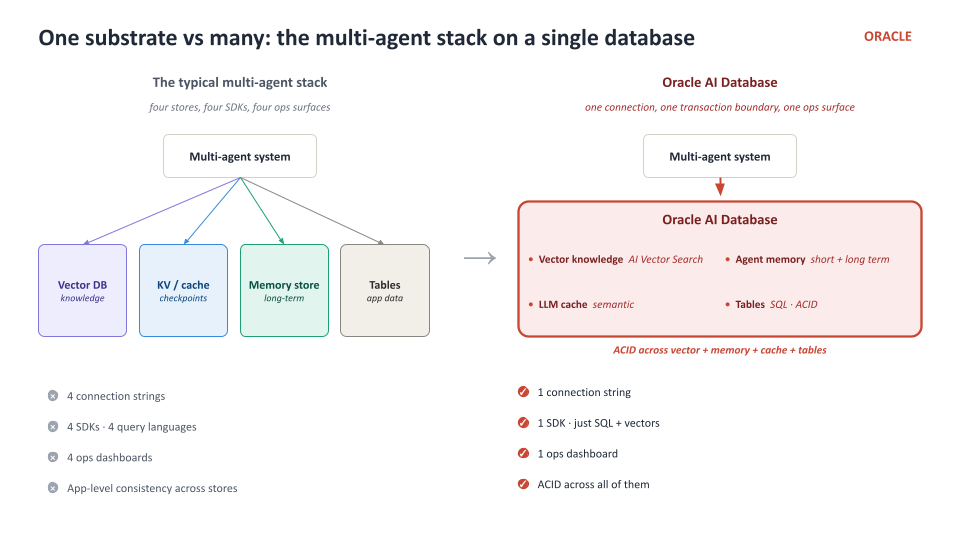
One connection string, one SDK, one ops surface, ACID across vectors + memory + cache + tables — instead of stitching a vector DB, KV store, and relational store together with three different SDKs and three different consistency models.
Provider-aware LLM
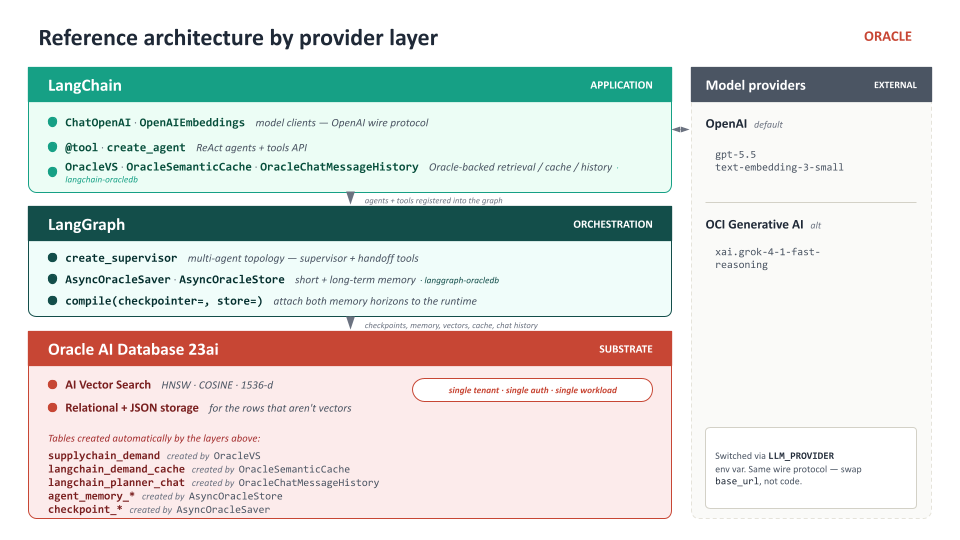
The chat model is provider-aware via LLM_PROVIDER. Both endpoints speak the OpenAI wire protocol, so the same ChatOpenAI client works in both modes — only the base_url and api_key change.
LLM_PROVIDER |
Required env vars | Default LLM_MODEL |
|---|---|---|
oci (default) |
OCI_GENAI_API_KEY, OCI_GENAI_ENDPOINT |
xai.grok-4-1-fast-reasoning |
openai |
OPENAI_API_KEY |
gpt-5.5 |
Embeddings are always in-database. No external embedding key required.
Repository layout
apps/supplychain-demand-planning-agent/
├── README.md                    ← you are here
├── docker-compose.yml           ← Oracle Free container
├── images/                      ← architecture diagrams + app screenshot
├── app/
│   ├── scripts/
│   │   ├── bootstrap.py             AGENT user + vector memory pool
│   │   ├── onnx_setup.py            downloads + loads the ONNX embedder
│   │   └── seed_supplychain.py      Hugging Face dataset → OracleVS + AsyncOracleStore
│   ├── backend/                  FastAPI + WebSocket supervisor streaming
│   │   ├── main.py
│   │   ├── config.py
│   │   ├── requirements.txt
│   │   ├── db/connections.py
│   │   ├── agent/{tools.py,supervisor.py,streaming.py}
│   │   └── api/{websocket.py,data.py,architecture.py}
│   └── frontend/                 React + Vite + Tailwind chat UI
│       ├── package.json
│       └── src/
│           ├── components/{ChatPane,MemoryContext,DataExplorer,ArchitectureExplorer,Layout,Header,ThreadList}.tsx
│           ├── useAgentSocket.ts
│           ├── theme.tsx
│           └── styles.css
├── workshop/
│   ├── notebook_student.ipynb    ← 9 blank-stub TODOs + hard-stop checkpoints
│   └── notebook_complete.ipynb   ← solutions filled in
└── docs/                         per-part guides + TODO checklist + troubleshooting
Quick start (local)
You need: Python 3.11+, Node 20+, Docker (or Podman), and an OCI Generative AI key (or OpenAI key).
# 1. Bring Oracle up (~3-5 min on first run).
docker compose up -d oracle-free
docker compose logs -f oracle-free | grep -m1 "DATABASE IS READY TO USE"

# 2. Python deps for setup + backend.
pip install -r app/backend/requirements.txt

# 3. Set provider credentials.
export LLM_PROVIDER=oci
export OCI_GENAI_API_KEY=sk-...
export OCI_GENAI_ENDPOINT=https://inference.generativeai.us-phoenix-1.oci.oraclecloud.com
# (or LLM_PROVIDER=openai + OPENAI_API_KEY=sk-...)

# 4. One-time setup — creates AGENT user, loads the ONNX embedder, seeds the data.
python app/scripts/bootstrap.py
python app/scripts/onnx_setup.py
python app/scripts/seed_supplychain.py

# 5. Start the backend (FastAPI on :8000).
python -m uvicorn app.backend.main:app --host 0.0.0.0 --port 8000 &

# 6. Start the frontend (Vite on :3000, proxies /api + /ws to :8000).
cd app/frontend && npm install && npm run dev -- --host 0.0.0.0 --port 3000
Open http://localhost:3000. Three starter prompts are wired into the chat input — try the Priya soccer-merchandise prompt to watch every layer light up.
Workshop notebooks
The workshop/ folder contains the same pattern as the app, built up primitive by primitive:
| Notebook | When to open |
|---|---|
workshop/notebook_student.ipynb |
Working notebook — 9 blank-stub TODOs each followed by a hard-stop assert |
workshop/notebook_complete.ipynb |
Same 12-part notebook with all 9 TODOs filled in — a reference once you’ve finished |
The per-part guides under docs/ walk through each primitive: in-DB embeddings, OracleVS, AsyncOracleStore, AsyncOracleSaver, OracleSemanticCache, the specialist agents, and the supervisor.
Memory taxonomy
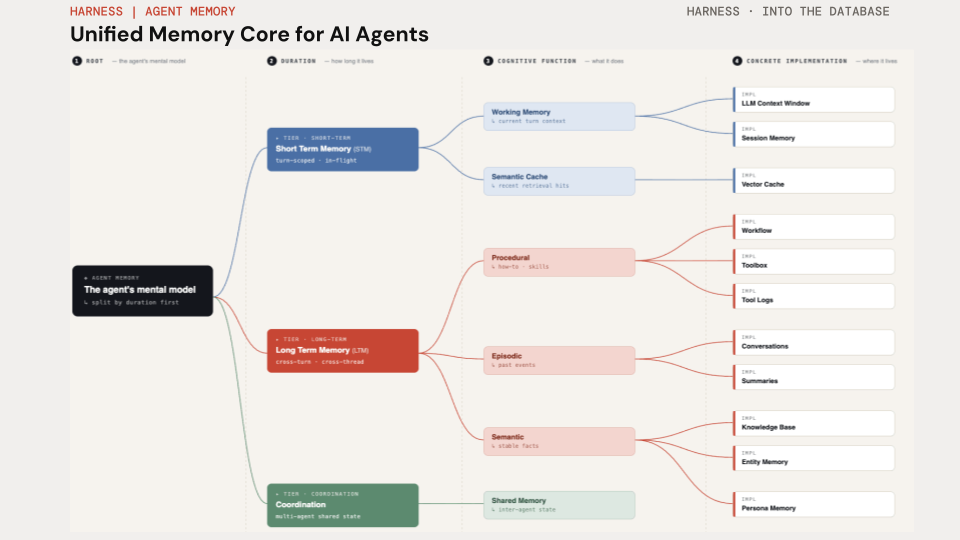
Agent memory splits first by duration (short-term vs long-term vs coordination), then by cognitive function (working, episodic, procedural, semantic, persona). The two memory primitives in this app cover the two horizons: AsyncOracleSaver is the short-term / per-thread tier, AsyncOracleStore is the long-term / cross-thread tier. Both live on Oracle AI Database.
Semantic cache
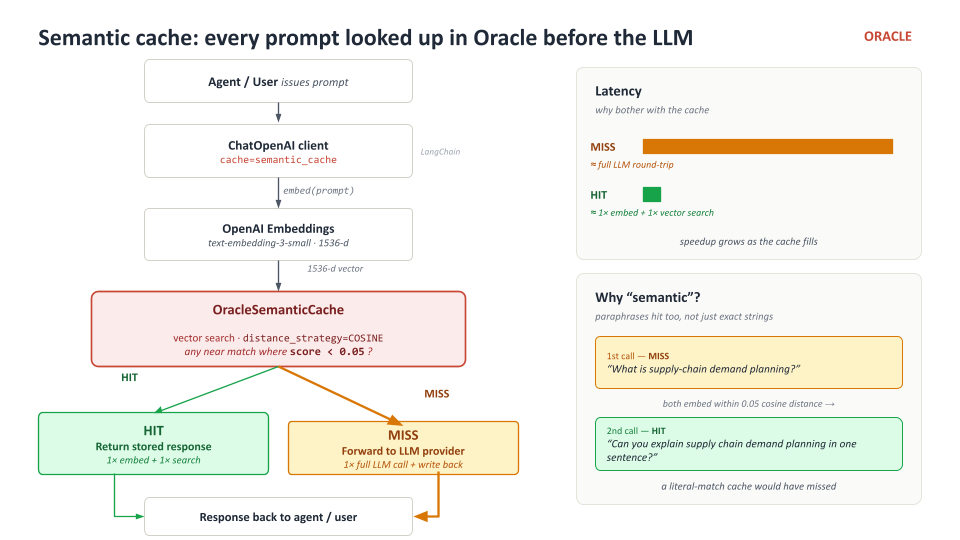
Traditional caches key by the literal request — two prompts asking the same thing in different words both miss. OracleSemanticCache keys by the embedding of the prompt, so paraphrases, capitalisation drift, and punctuation all collapse to the same cached response.
Related notebooks in this hub
notebooks/memory_context_engineering_agents.ipynb— the six types of persistent memory for AI agentsnotebooks/oracle_agentic_rag_hybrid_search.ipynb— vector + keyword + hybrid search in a single SQL querynotebooks/langchain_ecosystem/oracle_langchain_example.ipynb— first-look RAG on Oracle vector storage with LangChain