oracle-ai-developer-hub
Intelligent Document Processor — Oracle AI Database
Companion code for the article Build an Intelligent Document Processor in One Data Store.
Documents (purchase orders, delivery notes, invoices) go through this pipeline:
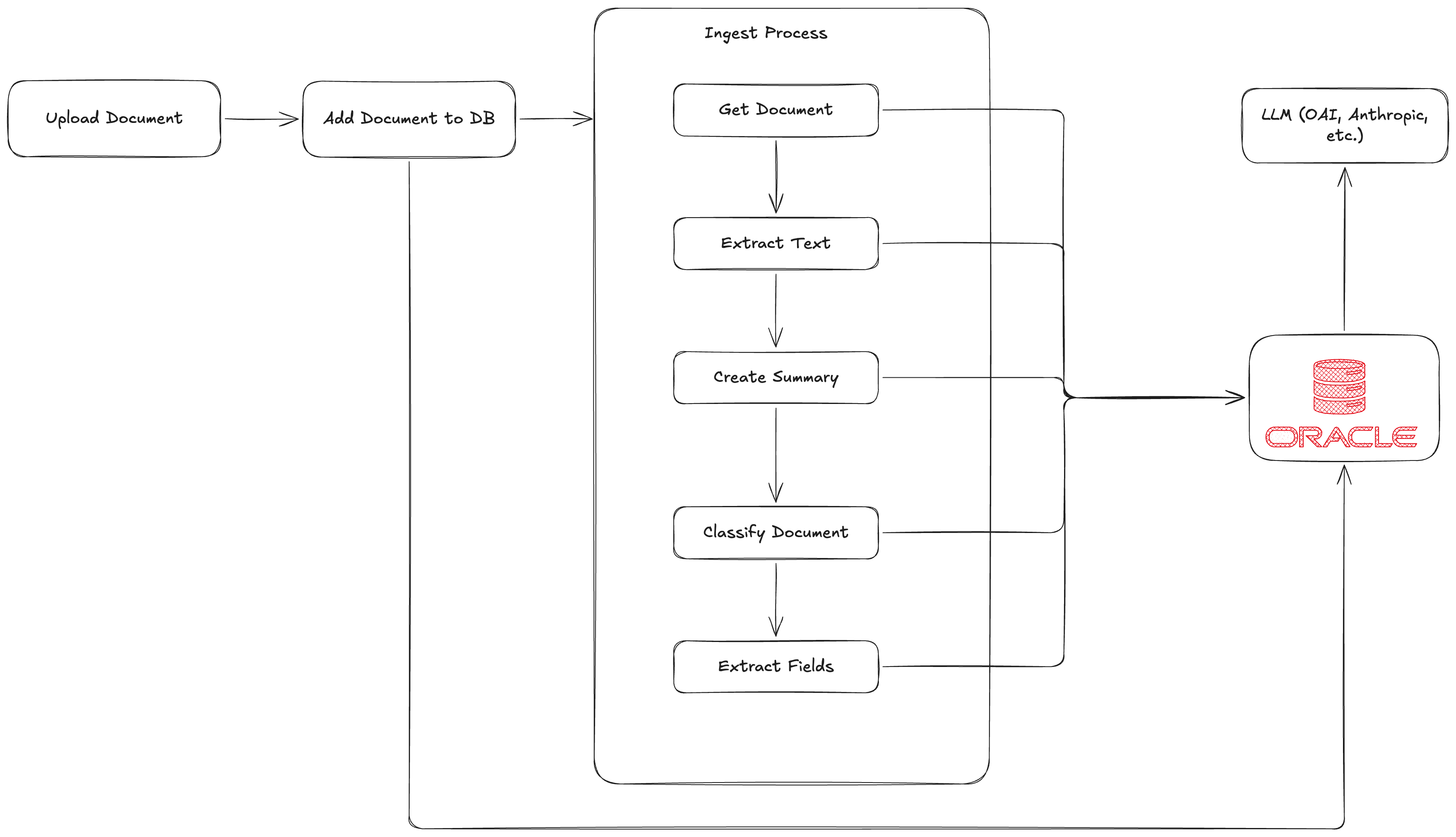
- Upload to a Hono API running on Lambda (Function URL).
- The file is stored as a
BLOBin Oracle AI Database. DBMS_VECTOR_CHAIN.UTL_TO_TEXTextracts text inside the database (embedded text only — no OCR for scanned/image PDFs).DBMS_VECTOR_CHAIN.UTL_TO_SUMMARYgenerates a deterministic extractive gist inside the database.VECTOR_EMBEDDINGproduces a 384-dim vector inside the database from an ONNX model loaded into Oracle (on the whole text here because the sample docs are short; chunk larger docs withUTL_TO_CHUNKS→UTL_TO_EMBEDDINGS).- A k-NN search over
VECTOR_DISTANCEclassifies the document by majority vote of its nearest labeled neighbors — no LLM call. DBMS_VECTOR_CHAIN.UTL_TO_GENERATE_TEXTcalls OCI Generative AI (meta.llama-3.3-70b-instructby default) from the database to extract typed JSON fields. Validated with Zod, written through a JSON Duality View intodocuments+document_fields.- The frontend reads the doc, renders fields, and shows similar documents via
VECTOR_DISTANCE.
Everything about the document lives in one Oracle AI Database instance — BLOB + extracted text + structured JSON + vector — and every AI step either runs inside the Oracle process or is initiated from it via DBMS_VECTOR_CHAIN. AWS provides only compute (Lambda + S3 + CloudFront).
Demo only. The Lambda Function URL has no auth. The
.envfile is the only source of secrets. Do not expose this stack publicly.
Prereqs
- Node 20+, pnpm 10+
- An OCI Free account with an Oracle AI Database (Autonomous, Always Free tier)
- An OCI API key under your user (see OCI Generative AI setup below)
awsCLI configured if you want to deploy the Lambda/S3/CloudFront stack
Quickstart
# 1. Install deps
pnpm install

# 2. Provision Oracle Autonomous AI Database (see docs/01-provision-oracle.md and docs/02-provision-oci-genai.md)

# 3. Configure secrets
cp .env.example .env
# Fill in ORACLE_* values, OCI_* values, and the path to your OCI private key

# 4. Bootstrap the database (creates user, schema, Duality Views)
pnpm db:setup

# 5. Register the OCI Generative AI credential inside the database
pnpm db:setup-oci-credential

# 6. Upload the ONNX embedding model into Oracle
pnpm db:setup-onnx                        # downloads via DBMS_CLOUD.GET_OBJECT + loads as model "doc_embedder"

# 7. Run locally
pnpm dev:api   # in one terminal, Hono on :8787
pnpm dev       # in another, Vite on :5173

# 8. Seed the demo with the committed sample PDFs
pnpm seed
OCI Generative AI setup
DBMS_VECTOR_CHAIN.UTL_TO_GENERATE_TEXT calls OCI Generative AI from the database using an OCI API key.
- OCI console → your profile → Tokens and keys → Add API key → Generate API key pair → download the private key (
.pem). - Copy the fingerprint from the newly added key.
- Copy your user OCID (Details tab) and tenancy OCID (profile dropdown → Tenancy).
- Use the root compartment OCID (same as tenancy OCID) or any compartment OCID.
- Drop them all into
.env(OCI_USER_OCID,OCI_TENANCY_OCID,OCI_COMPARTMENT_OCID,OCI_FINGERPRINT,OCI_PRIVATE_KEY_PATH). - Run
pnpm db:setup-oci-credential— it grants the required privileges to theidpuser, opens the outbound network ACL to the OCI Gen AI host, and registers the credential asOCI_CREDinside the database.
Deploying to AWS
pnpm cdk:deploy
Outputs include ApiUrl and WebUrl. After deploy:
# Build the SPA pointing at the deployed API URL
VITE_API_BASE_URL=<ApiUrl> pnpm --filter @idp/web build
# Sync to S3
aws s3 sync apps/web/dist/ s3://<WebBucketName>/ --delete
aws cloudfront create-invalidation --distribution-id <WebDistributionId> --paths '/*'
Tear down with pnpm cdk:destroy.
Repo layout
apps/web                — Vite + React + TanStack SPA
packages/core           — Ingest pipeline orchestrator + documents service
packages/db             — oracledb pool + repositories + Zod row schemas + in-DB LLM calls + .sql migrations
packages/schemas        — Zod schemas per doc type (used by the in-DB LLM call to validate JSON output)
packages/logger         — JSON logger
packages/shared         — Enums + constants
services/functions/api  — Hono Lambda handler
infrastructure          — CDK single stack
scripts/                — Sample-doc generator, db-setup, OCI credential setup, ONNX upload, seed
samples/                — Committed sample PDFs (generated by scripts/generate-sample-docs.ts)
docs/                   — Provisioning guides and the long-form article
Docs
- Provision Oracle AI Database (Autonomous) — create the DB, download the wallet, run migrations.
- Provision OCI Generative AI for in-DB classify + extract — API key, fingerprint, OCIDs, register the credential.
- Article: Build an Intelligent Document Processor in One Data Store — the long-form writeup of why and how.
What’s intentionally not here
- Authentication. Demo only.
- AWS Secrets Manager / SSM. The
.envfile is the source of truth and CDK bakes its values into Lambda env vars at deploy time. Lambda env vars are visible in the AWS console — fine for a tutorial, not for prod. - OCR for scanned (image-only) PDFs.
UTL_TO_TEXThandles digital PDFs only — left as exercise for the reader to swap in a vision model.
Scripts
| Command | Description |
|---|---|
pnpm samples |
Re-generate the sample PDFs (deterministic with --seed) |
pnpm db:setup |
Run migrations against the configured DB |
pnpm db:setup-oci-credential |
Grant privileges to idp, open network ACL, register OCI Gen AI credential, smoke-test |
pnpm db:setup-onnx |
Download and register the ONNX embedding model (doc_embedder) |
pnpm seed |
Upload every sample PDF to the API and wait for ingest |
pnpm dev |
Run the SPA locally on :5173 |
pnpm dev:api |
Run the Hono API locally on :8787 |
pnpm cdk:deploy |
Deploy the Lambda + S3 + CloudFront stack |
pnpm typecheck |
Typecheck every workspace package |